


Skip to content

Digital Transformation

Business Process Automation in Saudi Arabia: A Practical Guide

How Saudi businesses identify, prioritise and implement process automation — which processes to start with, how to choose between CRM, ERP and custom automation, what it costs and how to measure the result.

RaysanDev Team15 min read
An operations manager presenting an automated workflow diagram to colleagues in a Riyadh office

Most automation projects fail for an unglamorous reason: the business automated the process it noticed rather than the process that was costing it the most. Automation is not a product you buy — it is a decision about which repetitive work should stop consuming human attention, taken in an order that lets each step pay for the next. This guide covers how to find those processes, how to rank them, how to choose between configuring a CRM, extending an ERP or building something custom, and how to tell afterwards whether it worked.

Quick Answer

Business process automation is the use of software to run repeatable work — data entry, follow-ups, approvals, notifications, reporting — with little or no manual handling. A Saudi business should approach it by mapping how a process actually runs today, ranking candidates by frequency, time consumed, error rate and customer impact, then automating one high-volume process end to end before moving to the next.

Key Takeaways

  • Automate processes that are frequent, rule-based and measurable — not the ones that are simply most visible.
  • Map the real workflow before selecting any tool; automating a broken process makes the problem faster, not smaller.
  • Most business automation is configuration inside a CRM or ERP you already need, not bespoke development.
  • AI extends automation to unstructured work like classifying messages and drafting replies, but it belongs behind a review step until it earns trust.
  • Define the baseline metric before go-live, or you will have no way to prove the automation was worth its cost.

What Is Business Process Automation?

Business process automation is the use of software to carry out a repeatable sequence of business steps with minimal manual handling. A lead arrives, it is recorded, assigned to an owner, acknowledged, and escalated if nobody responds within a set period — all without a person copying anything anywhere. The work still happens; what changes is that the routine parts of it happen consistently, and the people involved spend their time on the parts that require judgement.

It helps to separate three things that are often used interchangeably. Digitisation means moving from paper to a screen. Digitalisation means running the process inside a system rather than a spreadsheet. Automation means the system executes steps and enforces rules on its own. Many companies believe they have automated a process when they have only digitised it — the form is electronic, but a person still reads it, retypes it into another system and remembers to follow up.

The practical test

If removing one employee from the chain for a week would stop the process, it is not automated. If the process continues and only the exceptions reach a human, it is.

This guide is about how to think through automation. If you are looking for a partner to do the mapping, configuration and integration, our business process automation service describes how RaysanDev delivers it for companies in Saudi Arabia and the GCC.

Why Saudi Businesses Are Automating Business Processes

The reasons that hold up in practice are operational rather than aspirational. Customers now expect a reply on WhatsApp within minutes rather than a call back the next morning. Teams are bilingual and distributed, and handovers between them are where information gets lost. Regulatory requirements such as e-invoicing have pushed finance workflows into systems that other departments then need to connect to. And growth exposes the limit of coordination by spreadsheet and group chat faster than most owners expect. The wider guide to digital transformation covers that context in full; this article stays on the operational layer.

  • Response speed: enquiries are acknowledged and routed the moment they arrive, at any hour.
  • Consistency: every customer receives the same process regardless of who is on shift.
  • Fewer handover errors: data is entered once and flows onward instead of being re-keyed.
  • Visibility: managers see status without asking for it, which removes a layer of reporting work.
  • Capacity: teams absorb more volume without proportional hiring, which is usually the point.

None of these require a company-wide programme. They are the cumulative effect of automating a small number of high-volume processes properly.

Which Business Processes Can Be Automated?

Almost any process that is repeated, rule-based and already produces a record can be automated to some degree. The categories below are where Saudi businesses most often find their first candidates.

Sales and Lead Management

Capturing enquiries from the website, WhatsApp and phone into one pipeline, assigning an owner by product or territory, setting the first follow-up automatically and escalating anything untouched after a defined period. This is the most common starting point because the cost of doing it badly is directly measurable in lost deals. It usually lives inside a CRM rather than in custom code.

Customer Support

Ticket creation from any channel, routing by category or language, acknowledgement messages, escalation when a response deadline passes, and a satisfaction request on closure. The gain is not only speed — it is that no request quietly disappears between an inbox and a group chat.

WhatsApp Communication

In Saudi Arabia, WhatsApp is where much of the customer relationship actually happens. Automating it means order and appointment confirmations, delivery and payment reminders, routing an incoming message to the right team with its history attached, and logging the conversation against the customer record. Done well it reduces manual messaging; done badly it produces broadcast spam. Our note on WhatsApp automation covers the operational requirements, including the Business API.

Finance and Administration

Quotation to invoice conversion, recurring invoices, payment reminders, expense approvals and reconciliation support. Finance automation is often the easiest to justify because the rules are already written down and the errors are already visible.

HR Processes

Leave requests and approvals, onboarding checklists, document expiry alerts for iqama and contract renewals, and attendance records feeding payroll. These are low-glamour, high-frequency processes where automation removes a persistent administrative drag.

Operations and Service Delivery

Job scheduling, dispatch, stock movements, purchase requests and project handovers between departments. Operations automation usually depends on an ERP because it needs shared master data — one definition of a product, a customer and a location.

Reporting

Scheduled dashboards and exception alerts instead of a manager rebuilding the same spreadsheet every Sunday. Reporting is often the cheapest automation available, because the data is already in the system and only the assembly is manual.

Data Entry and Repetitive Tasks

Re-keying between systems, copying details from a form into a sheet, renaming and filing documents. This is where the hours quietly go. Some of it is solved by integration rather than by automation software — if two systems talk to each other, the task disappears entirely.

What Should You Automate First?

The ranking matters more than the tool. Score each candidate process against seven criteria and the order usually settles itself without debate.

  1. Frequency — how many times a week does this run?
  2. Time consumed — how many staff hours does each run take end to end?
  3. Error rate — how often does it need correcting, and what does a correction cost?
  4. Business impact — does the process touch revenue, cash collection or compliance?
  5. Customer impact — does the customer feel the delay or the mistake?
  6. Implementation complexity — how many systems, exceptions and approvals are involved?
  7. ROI potential — hours or revenue recovered against the effort to automate.
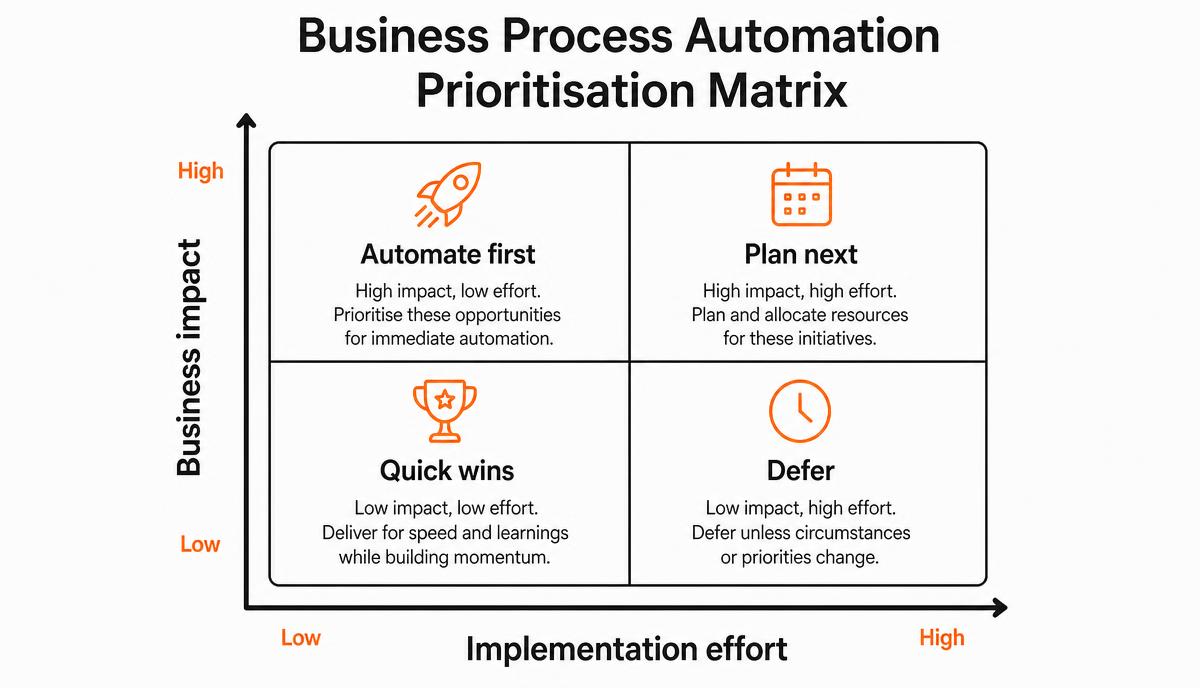
Prioritisation matrix plotting business impact against implementation effort, with quadrants for automate first, plan next, quick wins and defer
High impact and low effort first; high impact and high effort is planned, not skipped.
An indicative ranking. Substitute your own frequency and error figures before deciding.
ProcessFrequencyError impactComplexityTypical priority
Lead capture and assignmentDailyLost revenueLowFirst
Follow-up remindersDailyLost revenueLowFirst
Order and appointment confirmationsDailyCustomer trustLowFirst
Invoice generation and remindersWeeklyCash flowMediumSecond
Support ticket routingDailyCustomer trustMediumSecond
Leave and approval workflowsWeeklyInternal onlyLowSecond
Cross-system data syncContinuousData integrityHighThird
Custom operational workflowsVariesDelivery riskHighLater phase

One rule saves most of the trouble: do not automate a process you cannot describe on a single page. If the team cannot agree on how it runs today, automation will encode the disagreement.

CRM Automation vs ERP Automation vs Custom Automation

Three delivery routes exist and they solve different classes of problem. Choosing wrongly is the most expensive mistake available at this stage, because the cost shows up years later in maintenance. This guide takes the company-wide view across departments and systems; when the work sits entirely inside customer, sales and pipeline processes, the narrower discipline of CRM automation is the one to read.

ApproachBest forTypical effortMain risk
CRM automationCustomer-facing work: leads, pipeline, follow-ups, service, messagingConfiguration, weeksUnder-adoption if the pipeline does not match how sales actually works
ERP automationInternal operations: inventory, purchasing, finance, manufacturing, complianceConfiguration plus data work, monthsScope creep across departments
Custom automationGenuinely unique workflows, or connecting systems no product connectsDevelopment, variableOngoing ownership and maintenance cost

The practical order is to exhaust configuration first. Most requests that sound like custom development are met by a standard CRM or ERP once the process is described precisely. Custom software earns its place when the workflow is a genuine differentiator or when integration between existing systems is the actual requirement — not when it preserves a habit that a standard product handles differently.

Configure what you can, integrate what you must, and build only what makes you different.

How AI Changes Business Process Automation

Conventional automation handles structured, rule-based work: if the field says this, do that. Its limit is unstructured input — a customer message in mixed Arabic and English, a scanned purchase order, a free-text complaint. That is the boundary applied AI moves, and it is a real extension rather than a replacement.

  • Classifying and routing incoming messages by intent and language before a human sees them.
  • Drafting a reply from the customer's history for an agent to review and send.
  • Extracting fields from invoices, quotations and identity documents into structured records.
  • Summarising long conversation threads so the next person does not read forty messages.
  • Flagging anomalies — an unusual discount, a duplicate supplier, a stalled high-value deal.

Two constraints keep this honest. AI output should pass through a human review step until measured accuracy justifies removing it, and the process still has to be defined — AI applied to an undefined process produces confident inconsistency. Where those conditions hold, AI-assisted automation reaches work that rule-based tools never could.

How to Implement Business Process Automation

The sequence below is deliberately unremarkable. Nearly every failed automation project skipped steps two, three and eight.

  1. Identify the process and name a single owner who is accountable for the outcome.
  2. Map the current workflow exactly as it runs, including the informal steps and workarounds.
  3. Identify bottlenecks: where work waits, where it is re-entered, where it goes wrong.
  4. Design the improved workflow first — simplify and remove steps before any software is chosen.
  5. Select technology against the designed workflow, not the other way round.
  6. Implement a narrow first version covering the main path rather than every exception.
  7. Test with real historical cases, including the awkward ones the team remembers.
  8. Train users in their own language and, critically, explain what changes for them.
  9. Measure against the baseline you recorded before starting.
  10. Optimise: extend to exceptions, tighten rules and only then move to the next process.

Record the baseline first

Before go-live, write down current handling time, error rate and volume. Without that page, every later claim about improvement is an opinion.

Common Automation Mistakes

  • Automating a broken process instead of redesigning it, which multiplies the defect.
  • Starting with the most complex process because it is the most annoying.
  • Buying tools before mapping workflows, then bending the process to the software.
  • Automating everything at once so nothing gets tested properly.
  • Ignoring adoption: no training, no explanation, no visible benefit for the people using it.
  • Leaving no exception path, so staff quietly revert to WhatsApp and spreadsheets.
  • Skipping integration, which recreates the re-keying the project was meant to remove.
  • Never measuring, so the automation cannot be defended at the next budget review.

How Much Does Business Process Automation Cost?

There is no market price for automation, because the same phrase covers a single reminder rule and a multi-department workflow rebuild. What determines cost is scope: how many processes, how many users, how many systems must be connected, how clean the data is, how many exceptions the rules must handle and how much support you need afterwards. The digital transformation cost guide breaks those drivers down in detail.

  • Licences: usually priced per user per month, and rarely the largest line.
  • Implementation: configuration, workflow build and testing — normally the biggest single item.
  • Integration: each connection between two systems is its own piece of work.
  • Data preparation: cleaning and migrating records, routinely underestimated.
  • Training and change support: small in cost, decisive in outcome.
  • Ongoing support: a recurring annual line from year two onward.

A first automation scoped to one process with light integration is a modest, defined investment. The way to get a real number is to define that scope and have it priced line by line, rather than asking what automation costs in general.

How to Measure Automation ROI

Pick three or four metrics before go-live and report them monthly. Fewer metrics, measured consistently, beat a dashboard nobody reads.

MetricWhat it tells youHow to capture it
Hours per process runDirect labour savedTime the process before and after
First response timeCustomer-facing improvementSystem timestamps on enquiries
Error and rework rateQuality of the automated pathCount corrections per month
Throughput per personCapacity gained without hiringVolume handled ÷ people involved
Follow-up completionWhether the rules are actually followedOverdue tasks in the system
AdoptionWhether the automation is being used at allActive users and records created

Convert the hours saved into a monetary figure at a loaded staff cost and compare it with the implementation and annual running cost. If a process consumes forty hours a month and automation removes thirty of them, the payback period is arithmetic rather than argument.

When Should You Work With an Automation Partner?

Plenty of automation should be done internally. Reminder rules, pipeline stages and report schedules are configuration, and the people running the process understand it best. External help is worth its cost in narrower circumstances: when several systems must exchange data reliably, when a CRM or ERP rollout crosses departments, when migration is complicated by years of inconsistent records, when applied AI needs to be built with proper review controls, or when a previous attempt failed on adoption.

That is the work RaysanDev does — mapping the process, configuring CRM and ERP workflows, connecting systems, and building custom automation only where a standard product genuinely does not fit. A sensible engagement starts with one process and a written scope you could hand to any implementer. If you want that assessed, describe the process to us and we will scope it before quoting anything.

Conclusion

Automation rewards discipline rather than ambition. Find the process that consumes the most time or costs the most revenue, describe how it really runs, redesign it, then automate it inside a system you were going to need anyway. Measure the result, and let it fund the next one. Where that fits into a broader plan is covered in the digital transformation strategy guide.

The first step costs nothing: take one process, count how many hours it consumes this month, and write down what a correct run looks like. Everything else follows from that page.

Related questions

Tags:AutomationBusiness ProcessSaudi ArabiaCRMERPAI

FAQ

Questions about this topic

Insights

Related articles

A Saudi leadership team planning a phased transformation roadmap on a whiteboard in a Riyadh boardroom
Digital Transformation

How to Build a Digital Transformation Strategy for a Saudi Business

A step-by-step method for building a digital transformation strategy: defining objectives, assessing digital maturity, mapping processes, prioritising initiatives, choosing technology, phasing a roadmap, budgeting, preparing people and measuring results.

22 min read
Two Saudi managers reviewing a phased digital transformation budget and roadmap in a Riyadh office
Digital Transformation

How Much Does Digital Transformation Cost in Saudi Arabia?

What actually drives the cost of a digital transformation project — scope, users, licences, implementation, integration, migration, customisation, training and support — and how to build a defensible budget for your own business.

15 min read

See the full blog or the FAQ library.

Want one process automated properly?

Tell us which process costs you the most time. We will map it, propose a scoped first phase and show you what changes before anything is built.