


Skip to content

CRM

CRM Automation for Saudi Businesses: How to Automate Sales and Customer Follow-Up

Which CRM processes to automate first, how to design a workflow that survives contact with a real sales team, where rule-based automation ends and AI begins, and what should never be automated.

RaysanDev Team16 min read
A sales manager reviewing an automated pipeline board on a large screen in a modern Saudi office

Most sales teams do not lose deals because they lack effort. They lose them because the effort is spent on administration: retyping enquiry details, deciding who owns a lead, remembering who has not been called back, and updating a pipeline nobody trusts. CRM automation is the deliberate removal of that overhead, so the selling time goes to conversations. Done well it is invisible; done badly it produces noise that the team learns to ignore.

Quick Answer

CRM automation uses rules inside your CRM to perform routine work — capturing leads, assigning owners, creating follow-up tasks, sending reminders and notifications, updating pipeline stages and producing reports — without anyone doing it manually. A Saudi business should automate lead capture, assignment and follow-up reminders first, because those three prevent the most revenue loss for the least configuration effort.

Key Takeaways

  • Automate capture, assignment and follow-up before anything more sophisticated.
  • Every rule needs a trigger, a condition, an action, an owner, and a way to measure it.
  • Rule-based automation is predictable; AI is useful for judgement-adjacent tasks such as summarising and classifying.
  • Never automate pricing decisions, negotiation, complaint handling or relationship contact.
  • Automating an undefined process just makes the confusion faster and harder to see.

What Is CRM Automation?

CRM automation is a set of rules that react to events in your customer database. Something happens — a form is submitted, a stage changes, a quotation ages — and the system performs the follow-on work that a person would otherwise have to remember. It sits inside the CRM rather than beside it, which is what distinguishes it from the broader field of business process automation, which spans whole departments and several systems at once.

This guide is about automation specifically: the workflows, rules and AI-assisted steps that run inside a CRM you already have or are about to buy. It does not cover CRM fundamentals — what a CRM is, which features matter, how to evaluate systems and what implementation involves are answered in our guide to choosing and implementing a CRM.

The distinction worth holding onto is between work that must be done and work that must be decided. Automation should absorb the first category entirely and never touch the second.

It is also worth separating automation from integration, because the two are often bought together and confused afterwards. Integration moves data between systems; automation decides what should happen when that data arrives. A business can have excellent integration and no automation, in which case information is everywhere and nobody is prompted to act on it.

Why CRM Automation Matters

In a business receiving enquiries across WhatsApp, phone, website and walk-ins, the gap between an enquiry arriving and someone taking responsibility for it is where most revenue quietly disappears. Automation closes that gap mechanically: the record exists, the owner is set, and the clock is visible to a manager.

  • Response time improves because assignment no longer waits for a meeting or a message.
  • Follow-up stops depending on individual memory and personal notebooks.
  • Pipeline data becomes accurate, because updates are a by-product of work rather than a separate chore.
  • Managers supervise exceptions instead of chasing status.
  • Service quality becomes consistent regardless of who is on duty.

The financial argument is usually simpler than the productivity one. Take the number of enquiries received in a month, estimate honestly how many receive no second contact, and apply your normal conversion rate and average deal value to that group. For most Saudi SMEs the resulting figure is larger than the entire annual cost of the CRM, and it is recovered by three rules rather than by a strategy.

Which CRM Processes Should You Automate First?

Sequence by how much loss the process causes, not by how interesting it is to build. The order below holds for most Saudi SMEs.

Lead capture

Website forms, WhatsApp messages, phone logs and campaign responses should all create CRM records automatically, with the source preserved. Manual entry is both a cost and a data-quality problem: what is not typed does not exist.

Lead assignment

Assign by product, city, language, deal size or rotation, immediately on creation, with reassignment if the owner does not act within a defined period. An unowned lead is a lost lead with a delay.

Follow-up

Every stage should generate its own next action with a due date — first contact, quotation follow-up, post-visit check. The task is automated; the conversation is not.

Sales tasks

Site visits, document collection, technical reviews and approval requests can be created automatically when a deal reaches the stage that requires them, so process steps are not skipped under pressure.

Appointment reminders

A reminder to the customer the day before, and to the employee an hour before, reduces no-shows measurably and costs one rule to configure.

Customer communication

Acknowledgements, quotation delivery, order confirmations and status updates are transactional messages that should be triggered by events rather than written from scratch each time.

Pipeline updates

Sending a quotation, receiving a signed document or logging a lost reason can move the stage automatically. This is what makes the forecast credible enough to act on.

Reporting

A scheduled weekly summary — new leads by source, overdue follow-ups, deals stalled beyond a threshold — sent to managers automatically replaces the ritual of requesting numbers.

Keep the automated report short enough to be read on a phone. A summary that runs to three pages is filed rather than used, and the point of the exercise is that a manager sees the exceptions before the week starts instead of after it ends.

CRM Automation Examples for Saudi Businesses

The following patterns recur across sectors and are deliberately unglamorous — which is why they work.

Notice what each example has in common: the rule handles timing and record-keeping, while the human handles the conversation. That division is what keeps automated processes acceptable to both customers and staff, and it is the reason these patterns survive longer than more ambitious ones.

  • A contractor receives a WhatsApp enquiry outside working hours: the CRM creates the lead, sends an acknowledgement with working hours, and queues it to the estimator at 8am.
  • A trading company sends a quotation: the system schedules a follow-up task for three working days later and escalates to the sales manager if the task is still open after five.
  • A training academy takes a registration enquiry: the lead is routed by course and language, and a reminder is sent to the parent the day before the scheduled call.
  • A service business closes a job: a satisfaction message is sent, and a renewal task is created eleven months later so the relationship is not left to memory.
  • A B2B supplier sees a deal untouched for thirty days: it is flagged as inactive, reassigned to a nurture sequence, and removed from the active forecast.

Rule-Based CRM Automation vs AI-Assisted Automation

These are different tools for different problems. Rule-based automation executes a decision you have already made. AI-assisted automation produces a suggestion about something you have not defined precisely — which is powerful and, for the same reason, requires review.

In a mature setup the two work as a sequence rather than as alternatives: a model interprets an unstructured message, and a deterministic rule acts on the label it produced. That arrangement keeps the auditable part auditable. If the outcome is wrong, you can see whether the classification failed or the rule did, which is impossible when a single opaque process handles both.

Rules for what must always happen; AI for what needs interpretation before a person acts.
AspectRule-based automationAI-assisted automation
BehaviourDeterministic and repeatableProbabilistic, varies by input
Best forAssignment, tasks, notifications, stage changesSummarising, classifying, prioritising, drafting
Set-upConfiguration in the CRMModel selection, prompts, testing on real data
Failure modeWrong rule, visible immediatelyPlausible but incorrect output
Oversight neededLow once testedHuman review before customer-facing use
Cost profileIncluded in most CRM tiersUsage-based on top of the CRM

CRM Automation With WhatsApp

For most Saudi businesses WhatsApp is where automation produces the fastest visible return, because it is where the volume is. Capture, assignment, acknowledgement, appointment reminders and status notifications all map naturally onto the channel, provided outbound messaging respects template and opt-in rules. The channel-specific detail — verification, shared numbers, routing and reporting — is covered in our guide to WhatsApp CRM for Saudi businesses, and the underlying setup work in our WhatsApp automation service.

One rule for messaging automation

Automate messages that the customer is expecting — confirmations, reminders, status updates. Anything the customer did not ask for should be a human decision, not a rule.

CRM Automation With AI

Used narrowly, AI removes the interpretation work that slows a sales team down. Each of these applications can be checked by the person using it, which is what makes them safe to deploy.

  • Summarisation: turning a long bilingual conversation into a short note on the record before a handover.
  • Classification: labelling incoming messages as enquiry, complaint, support or supplier so routing rules can act.
  • Lead prioritisation: ranking open leads on observable signals such as engagement, source and stage age.
  • Response assistance: drafting a reply the salesperson edits, particularly across Arabic and English.
  • Data extraction: pulling quantities, locations, dates or document references out of free text into fields.
  • Workflow triggering: detecting an intent such as a cancellation request and starting the correct rule-based process.

The failure pattern is deploying AI over messy data and undefined processes and expecting it to compensate for both. It will not; it will produce confident output shaped by the same disorder. Fix the process first, then apply the model. Our AI business automation work follows that order deliberately.

How to Design a CRM Automation Workflow

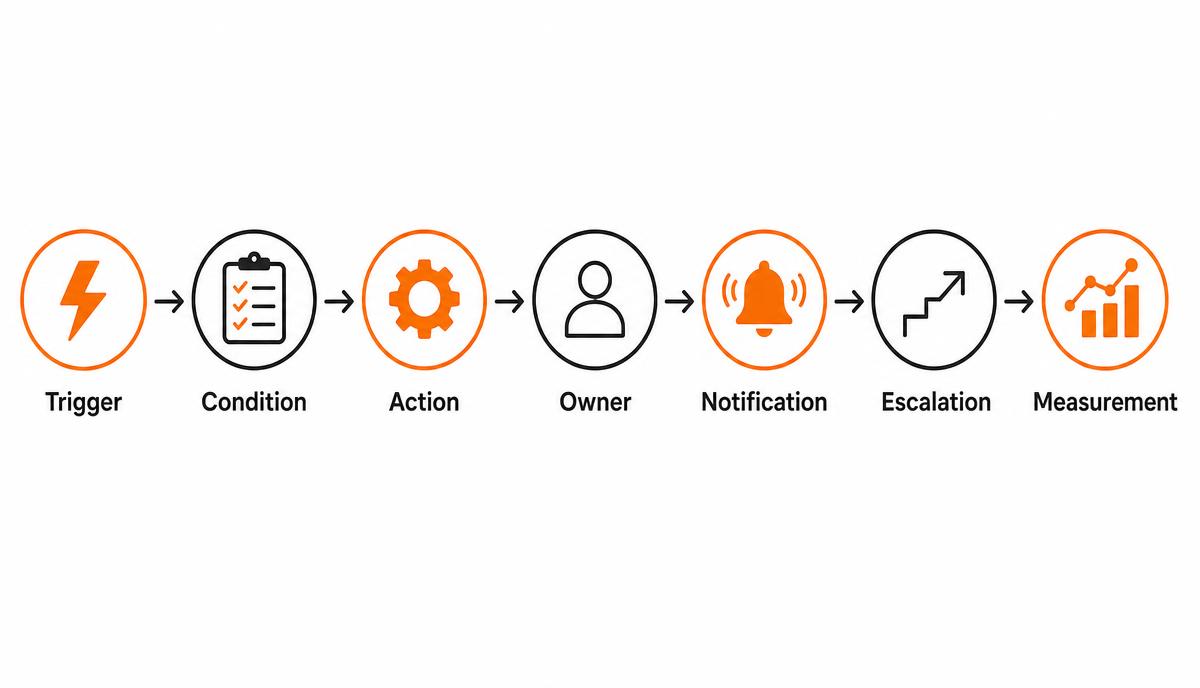
Write every rule against the same seven-part structure. If any part is missing, the automation will eventually misfire in a way nobody notices.

Write it before configuring anything, in one or two sentences per part, and have the person who will own the outcome read it. Most rules that fail in production were understood differently by the person who requested them and the person who built them, and a short written definition surfaces that disagreement while it is still free to fix.

Diagram of a CRM automation rule as a sequence: trigger, condition, action, owner, notification, escalation and measurement
A workflow that cannot name its owner and its measurement is not finished.
  1. Trigger: the exact event that starts the rule — record created, stage changed, field updated, time elapsed.
  2. Condition: the filter that keeps it from firing where it should not, such as deal value, branch or language.
  3. Action: the single thing the system does — create a task, send a template, update a field, open a ticket.
  4. Owner: the named role accountable for the outcome, never a team in the abstract.
  5. Notification: who is told, through which channel, and whether it is genuinely worth interrupting them.
  6. Escalation: what happens when the action is not completed within the agreed period.
  7. Measurement: the number that proves the rule is working, reviewed after the first month.

Two practical habits make the difference between a rule set that ages well and one that becomes a liability. Test each rule against real historical records rather than an invented example, because production data always contains the case nobody described. And keep a short written register of every active rule with its owner and its purpose — after two years and several staff changes, nobody remembers why the system sends a particular message, and the register is what stops it being switched off blindly.

An automation without an owner is a notification nobody answers, and an automation without a measurement is a habit nobody audits.

What Should You NOT Automate?

Some work looks automatable and is not, because the value lies in the judgement rather than in the step. Automating these damages relationships faster than the efficient parts repay them.

  • Pricing decisions and discount approvals, where context and margin judgement are the whole task.
  • Negotiation and objection handling, which depend on reading the other party.
  • Complaint responses, where an automated reply reads as indifference at the worst possible moment.
  • Relationship contact with key accounts, who notice immediately when the message was not written for them.
  • Qualification of large or unusual opportunities, where a scoring rule will confidently mis-rank them.
  • Anything requiring a commitment the business may not be able to keep, such as delivery dates.

A reliable test before automating anything customer-facing: if the automated version were sent to your most valuable customer at the worst possible moment, would it damage the relationship? Order confirmations survive that test. An automatic discount refusal, a templated apology or a scripted response to a serious complaint does not, and the exception handling should be designed before the rule is switched on.

The cultural point

In Saudi B2B markets much business runs on personal trust. Automating the administration around a relationship strengthens it; automating the relationship itself is noticed and resented.

How Much Does CRM Automation Cost?

Basic automation is usually configuration inside a CRM licence you already pay for, so the real question is what your requirements add on top of it.

The largest hidden cost is internal rather than invoiced: the time your managers spend agreeing what the process should be. That work is unavoidable and it is where most of the value is created, but it is rarely in anyone's budget, and projects that treat it as an afterthought either stall or produce rules that describe an imaginary business.

The recurring line most businesses forget is maintenance — automation is not a one-time build.
Cost driverWhat increases it
CRM tierAutomation, permissions or API access sitting behind a higher plan
Number of workflowsEach rule needs design, configuration and testing
Process clarityUndefined processes turn configuration into consultancy
IntegrationsRules that span CRM, WhatsApp, ERP or a website
Messaging volumeUsage-based conversation charges for outbound notifications
AI usagePer-request model cost plus evaluation and monitoring
MaintenanceRules need revising whenever the process changes

Where automation is part of a wider CRM project, the full budgeting picture is set out in how much CRM implementation costs in Saudi Arabia.

How to Measure CRM Automation ROI

Record the baseline before configuring anything. Without it, the debate about whether automation worked becomes a matter of opinion, and opinion favours whoever objected loudest.

KPIWhat it tells you
First response timeWhether capture and assignment rules actually fire
Follow-up completion rateWhether scheduled actions are being done, not just created
Conversion rate by stageWhere the process leaks after automation is in place
Sales cycle lengthWhether removed delay translates into faster closing
Deals per salespersonProductivity gained from reduced administration
Lead leakageEnquiries with no owner or no activity — should approach zero
Customer response rateWhether automated messages are welcome or ignored

Review after thirty days and again at ninety. Early results usually show response time improving first, conversion later, and productivity last — because habits change more slowly than configuration.

Be prepared for one counter-intuitive result. Automation frequently makes the numbers look worse at first, because enquiries that previously vanished are now recorded and counted. A conversion rate that drops while total volume rises is usually evidence that the capture rules are working, not that sales performance has fallen — and reading it the other way is the fastest way to lose confidence in a project that is actually succeeding.

Common CRM Automation Mistakes

  • Automating a process nobody has agreed on, which locks the disagreement into software.
  • Building forty rules in the first month, so no one can explain why the system did something.
  • Notifying everyone about everything until the team filters all system messages out.
  • Using automation to police the sales team rather than to remove their administration.
  • Ignoring Arabic in templates and notifications, which makes the output feel foreign to customers.
  • Leaving no manual override for the exception that any real business will produce weekly.
  • Never revisiting rules after the process changes, so the automation slowly starts working against the team.

Most of these share one root cause: automation was treated as a technical deliverable with a completion date rather than as an operating habit. The businesses that get lasting value review their rules on a fixed schedule, retire the ones nobody relies on, and treat every new request as a change to a documented process rather than as a quick addition to the system.

When Should You Work With an Automation Partner?

Simple rules inside a well-configured CRM are an internal task, and should stay one. A partner is worth engaging when workflows cross systems, when WhatsApp and an ERP are both involved, when AI is being introduced and needs evaluating against your own data, or when a previous automation attempt produced noise and the team has stopped trusting the system. RaysanDev configures Bitrix24 CRM automation, connects it to messaging and operational systems, and builds custom workflow components only where the standard product genuinely cannot reach.

Conclusion

CRM automation pays off when it is narrow, owned and measured. Start with capture, assignment and follow-up; write each rule with a trigger, condition, action, owner, notification, escalation and measurement; keep AI on summarising, classifying and drafting until it has earned more; and leave judgement, pricing and relationships to people. Treated this way it becomes a durable part of a wider digital transformation rather than a set of rules the team works around. To scope it against your own pipeline, tell us how your sales process runs today.

Related questions

Tags:CRMAutomationSalesAISaudi Arabia

FAQ

Questions about this topic

Insights

Related articles

A finance and operations manager reviewing a CRM implementation budget breakdown on a desk
CRM

How Much Does CRM Implementation Cost in Saudi Arabia?

What actually drives CRM cost in Saudi Arabia — licences, implementation, data migration, integrations, automation, training and ongoing support — and how to compare quotations without being misled by the licence price.

12 min read

See the full blog or the FAQ library.

Want your CRM to do the follow-up for you?

Tell us how leads arrive and how your team follows up today. We will map the first set of automation rules and what each one should measure.