


Skip to content

CRM

CRM for Saudi Businesses: A Complete Guide to Choosing and Implementing a CRM

What a CRM actually does, which features matter, how to evaluate systems, what implementation involves, and how to measure whether it worked — written for Saudi businesses choosing a CRM for the first time.

RaysanDev Team17 min read
A sales team in a Riyadh office reviewing a customer pipeline dashboard together

Most Saudi businesses do not buy a CRM because they want new software. They buy one because a deal was lost to a follow-up nobody made, because the customer history lives on a departed employee's phone, or because nobody can answer how many live opportunities the company has this month. A CRM solves those problems only if it is chosen against how your business actually sells and implemented with the discipline to make people use it. This guide covers both — what a CRM does, how to evaluate one, and what implementation really involves.

Quick Answer

A CRM is a system that holds every customer and prospect in one shared record: who they are, every conversation, every quotation, the stage of the deal and the next action due. Saudi businesses need one because enquiries arrive across WhatsApp, phone, website and email, and without a single record follow-ups are missed, customer history disappears when staff leave, and management has no reliable view of the sales pipeline.

Key Takeaways

  • A CRM's core value is one shared, durable record of every customer relationship — not the feature list.
  • Choose against how your team actually sells; a pipeline that does not match reality will not be used.
  • Adoption is the deciding factor. A well-adopted simple CRM beats an ignored sophisticated one.
  • Integration with WhatsApp, your website, accounting and ERP is what stops re-keying and makes the data trustworthy.
  • Set a small number of KPIs before go-live — response time, follow-up completion, conversion, pipeline visibility.

What Is a CRM?

CRM stands for customer relationship management. In practice, a CRM system is a shared database of everyone your business sells to or serves, along with the full history of the relationship: enquiries, conversations, quotations, orders, complaints, and the next action someone owes them. Every person in the company sees the same record, and that record survives staff turnover.

The distinction that matters is between a contact list and a CRM. A contact list stores names. A CRM stores state — which stage a deal is at, who owns it, what was promised, and what happens next. That state is what makes forecasting, accountability and automation possible.

The question a CRM should answer instantly

How many live opportunities do we have, who owns each one, and what is the next action on each? If your business cannot answer that in under a minute, that is the gap a CRM fills.

This guide is platform-neutral and written to help you decide. When you are ready for a partner to select, configure and roll out the system, our CRM implementation service explains how RaysanDev delivers that across Saudi Arabia.

Why Saudi Businesses Need a CRM

Enquiries in Saudi Arabia rarely arrive through one channel. A customer messages on WhatsApp, calls the branch, fills a form on the website and later replies by email — often to different people. Without a shared record, each of those is a separate conversation and nobody owns the outcome. Add bilingual communication, weekend and holiday patterns that differ from suppliers abroad, and rapid team growth, and the coordination problem outgrows spreadsheets quickly. This is the operational layer of the broader digital transformation picture.

  • Nothing is lost when an employee leaves: the history belongs to the company, not the handset.
  • Every enquiry has an owner and a due next action, whichever channel it came from.
  • Management sees the pipeline without asking the team to prepare a report.
  • Response times become measurable, and therefore improvable.
  • Marketing spend can be traced to actual closed business rather than to enquiry volume.

What Can a CRM System Manage?

The scope below is what a mainstream CRM covers out of the box. You will not use all of it in the first phase, and you should not try to.

Leads

Every enquiry captured with its source, product interest and owner from the moment it arrives. Capture should be automatic from the website, WhatsApp and campaigns — a lead that depends on someone remembering to type it in is a lead that will sometimes not exist.

Sales Opportunities

Qualified leads become opportunities with a value, an expected close date and a stage. This is what turns a list of contacts into a forecast, and it is the single most useful object in a CRM for management.

Customer Communication

Emails, calls, meetings and messages logged against the customer record. The goal is not surveillance; it is that the next person to speak to that customer knows what was already said and promised.

Follow-ups

Scheduled next actions with owners and due dates, plus automatic reminders and escalation when something is overdue. Follow-up discipline is where most of the measurable revenue improvement from a CRM comes from.

Tasks and Activities

Work assigned to people and linked to a deal or customer, so activity is visible in the context that created it rather than in a separate task app nobody opens.

Customer History

Past orders, quotations, invoices, support tickets and documents in one place — the difference between a customer feeling recognised and being asked to explain their situation again.

Reporting

Pipeline by stage and owner, conversion rates, lead sources, activity levels and response times. Reports are only as honest as the data entry behind them, which is why adoption matters more than dashboard design.

Marketing

Segmented lists, campaign tracking and attribution back to closed deals. Modest use here — knowing which channel produces real customers — is usually worth more than elaborate campaign automation.

Customer Service

Tickets, categories, response deadlines and resolution history attached to the same customer record the sales team uses. One record, two departments.

Key CRM Features to Look For

Feature lists are long and mostly similar. These are the ones that decide whether the system works in daily use. This guide stays at the level of choosing and running a CRM; the workflow rules behind the automation line below — assignment, follow-up creation, pipeline actions and AI-assisted steps — are covered in the dedicated guide to automating CRM workflows.

  • Contact and company management with duplicate control — messy data undermines everything above it.
  • Pipeline management with stages you can define to match your own sales process.
  • Task and activity management with reminders, ownership and overdue visibility.
  • Automation: assignment rules, follow-up creation, notifications and escalation.
  • Reporting you can configure yourself without a consultant for every question.
  • Integrations: website forms, WhatsApp, email, accounting or ERP, and an open API.
  • Permissions: who sees which customers, which is often a precondition for sales-team buy-in.
  • Mobile access that is genuinely usable for field and branch teams.
  • Communication channels handled inside the system rather than beside it.
  • AI capabilities where they are practical — summarising, drafting, classifying — rather than as a badge.

Arabic and RTL support

For Saudi teams, check the Arabic interface, right-to-left layout, Arabic search behaviour and Hijri date handling during the trial, not after purchase.

CRM for Sales Teams

For a sales team, the CRM has to earn its place by removing work rather than adding a reporting obligation. That happens when leads arrive already assigned, when the next action is created automatically after a call is logged, when a quotation can be produced from the record, and when the weekly review reads the pipeline from the system instead of from a spreadsheet each rep rebuilds on Sunday.

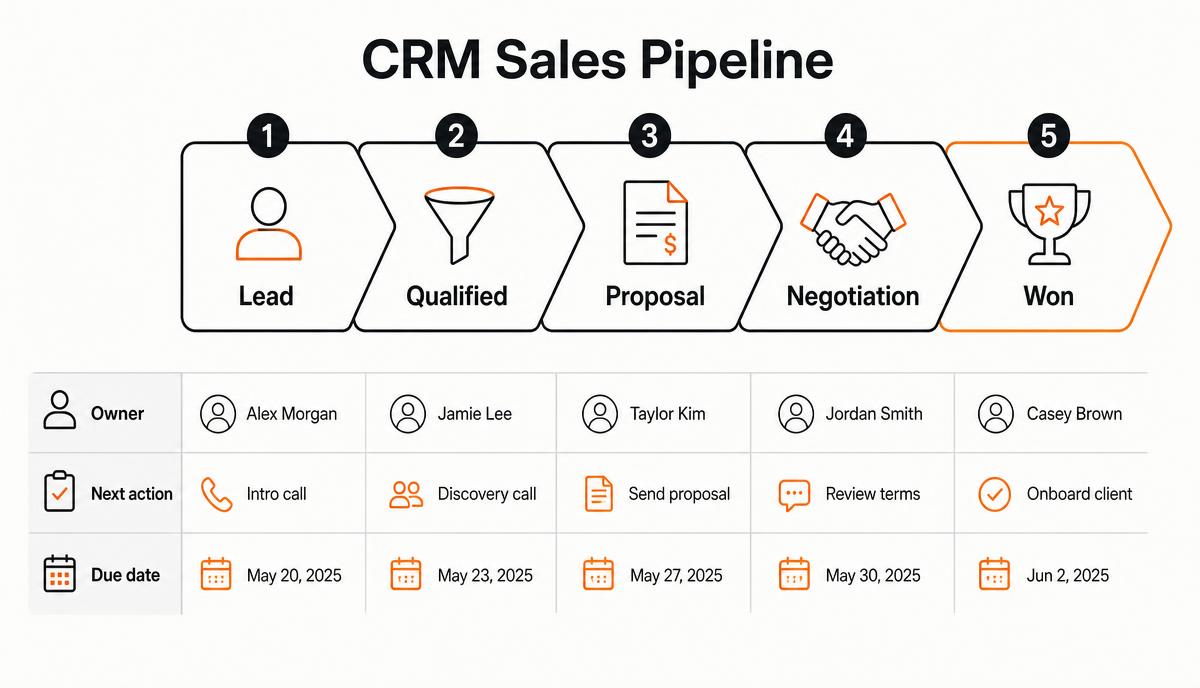
Diagram of a CRM sales pipeline with lead, qualified, proposal, negotiation and won stages, each showing an owner, next action and due date
A workable pipeline: few stages, one owner, one next action, one due date.

Keep the pipeline short. Five to seven stages that reflect real decision points beat a fifteen-stage process that people click through mechanically. If a stage cannot be defined by an observable event — a proposal sent, a site visit completed — it is not a stage.

CRM for Customer Service

Service teams need the same record from a different angle: what has this customer bought, what has gone wrong before, and what response deadline applies now. Running service in the CRM rather than a separate inbox gives categories, response targets, escalation and a resolution history that sales can see before their next conversation.

The operational gain is that complaints stop being personal knowledge. When a service issue is a record with a deadline rather than a message in someone's chat, it either gets resolved or it becomes visible — both are better than the alternative.

CRM and WhatsApp

In Saudi Arabia this is often the deciding integration. Connecting WhatsApp to the CRM through the Business API means incoming messages create or update a customer record, conversations are logged against that record, replies can be sent by whoever owns the customer, and confirmations or reminders can be sent automatically. The alternative — a shared phone, or several personal phones — puts the most active sales channel outside the system entirely. Our page on WhatsApp automation sets out what the Business API requires in practice, and running WhatsApp conversations through a CRM covers the day-to-day handling in more depth.

  • Incoming messages become leads or attach to existing customers automatically.
  • Conversation history survives staff changes and device changes.
  • Templates handle confirmations, reminders and updates without manual messaging.
  • Routing sends the message to the right team with the customer's context attached.

CRM and AI

Applied carefully, AI inside a CRM handles the unstructured work that rules cannot: summarising a long thread before a call, drafting a reply for review, classifying an incoming message by intent and language, extracting details from an attached document, or flagging deals that have gone quiet. These are useful because they reduce reading and typing, not because they make decisions. Keep a human review step until measured accuracy justifies removing it — the same principle applies across AI-assisted automation generally.

AI is useful in a CRM to the exact extent that the underlying data is complete. It cannot summarise conversations nobody logged.

CRM Integration With Other Business Systems

A CRM that does not exchange data with the rest of the business becomes another place to type. The connections that matter most are the website, messaging channels, email, and whichever system holds products, stock, invoices and payments — usually accounting software or an ERP such as Odoo. If you are still deciding whether the next system should be a CRM at all, the difference between a CRM and an ERP is worth settling first.

  • Website and landing-page forms creating leads directly, with the source recorded.
  • WhatsApp, email and telephony logged against the customer record.
  • Accounting or ERP for products, quotations, invoices and payment status.
  • Support tooling so service history is visible to sales, and vice versa.
  • An open API for anything specific to your business that no product connects.

Decide early which system is the master for each type of data — customers, products, prices. Two systems that both believe they own the price list will produce an argument every month.

How to Choose the Right CRM

Write down your sales process first, then evaluate systems against it. Choosing a CRM before defining the process is how companies end up reshaping how they sell to suit a piece of software.

Score shortlisted systems against your own weighting rather than a generic feature comparison.
Evaluation criterionWhat to askWhy it matters
Process fitCan we model our actual pipeline without workarounds?Determines whether the team uses it
Ease of useCan a new rep log a call in under a minute on mobile?Adoption depends on daily friction
Arabic and RTLIs the Arabic interface complete, not partial?Bilingual teams need both properly
IntegrationDoes it connect to WhatsApp, our website and our accounting system?Prevents re-keying and data drift
Automation depthCan we build assignment and follow-up rules ourselves?Reduces dependence on a vendor
ReportingCan a manager build a report without help?Determines whether data gets used
PermissionsCan we control record visibility by team or role?Often a precondition for buy-in
Total costLicences plus implementation, integration and support?Licence price alone is misleading
Data ownershipCan we export everything, and who holds admin rights?Protects you from lock-in

Run a trial with real data and two or three real deals. A demo shows what the software can do; a trial shows what your team will actually do with it.

How Much Does CRM Cost?

CRM cost has two distinct parts: recurring licences, usually priced per user per month, and a one-off implementation covering configuration, data migration, integrations, automation and training. Licences are the visible number and rarely the largest one. The drivers are user count, how many integrations you need, the state of your existing data and how much customisation you commission. The digital transformation cost guide explains how these lines behave across projects generally, and we break the individual lines down in detail in what a CRM implementation costs in Saudi Arabia. The data migration line is the least predictable of them, because it depends on the state of the records you already hold — see moving from spreadsheets and legacy systems to a CRM.

Two habits keep the budget honest: ask every vendor to separate licences, implementation, integration and first-year support into distinct lines, and budget for year two, when implementation has ended but licences and support have not.

How to Implement a CRM Successfully

CRM projects fail on adoption far more often than on technology. The phased sequence below exists to make adoption likely.

  1. Define the sales and service processes you intend to run inside the system.
  2. Agree the pipeline stages and what evidence moves a deal from one to the next.
  3. Clean the customer data before migrating it — deduplicate, standardise, and delete what is dead.
  4. Configure fields, stages, permissions and templates to match the agreed process.
  5. Connect the channels that generate enquiries: website, WhatsApp, email.
  6. Add automation for assignment, follow-up creation and escalation.
  7. Migrate data and validate it with the people who know the customers.
  8. Train by role — sales, service, management — in the language each team works in.
  9. Go live with a single team or branch first, then extend once it is working.
  10. Review after 30 and 90 days against the KPIs you set before starting.

One rule that decides adoption

If it is not in the CRM, it did not happen. Management has to run reviews from the system and stop accepting parallel spreadsheets — otherwise both systems are maintained badly.

Common CRM Implementation Mistakes

  • Buying before defining the sales process, then configuring around a demo.
  • Migrating dirty data, which destroys trust in the system in the first week.
  • Creating too many mandatory fields, so reps enter nonsense to move on.
  • Designing a fifteen-stage pipeline nobody can distinguish between.
  • Treating the CRM as a management reporting tool rather than a sales tool.
  • Leaving WhatsApp outside the system while it carries most conversations.
  • Training once at go-live and never again as people join.
  • No named internal owner, so nobody maintains the configuration as the business changes.

How to Measure CRM Success

Choose a handful of measures before go-live and record their current values. Comparing them after 90 days is what turns the CRM from an expense into a decision you can defend.

KPIWhat it indicatesWhere it comes from
Lead response timeSpeed of first contact after an enquirySystem timestamps
Conversion rate by stageWhere deals are actually lostPipeline reports
Sales cycle lengthHow long a deal takes to closeCreated and closed dates
Follow-up completionWhether the process is being followedOverdue activities
Customer retention and repeat businessHealth of the relationship after the first saleOrder history
Pipeline visibilityShare of live deals with a value, stage and next actionData completeness check
Sales productivityDeals handled per repActivity and closure reports
AdoptionWhether the system is used dailyActive users, records created

Adoption belongs on that list deliberately. Every other metric is unreliable until it is high.

When Should You Work With a CRM Implementation Partner?

A small team with a simple sales process and clean data can set up a CRM themselves, and often should. A partner earns their cost when several channels and systems must be integrated, when years of inconsistent records need migrating, when sales and service must share one configuration across departments, when automation and permissions get complex, or when a previous CRM attempt failed and the team is sceptical.

That is where RaysanDev works: defining the process, configuring the CRM, connecting WhatsApp and the website, migrating data, and building custom extensions only where a standard product genuinely does not fit. If you want a scoped view of what your own implementation involves, tell us how you sell today.

Conclusion

A CRM is not complicated in concept: one record per customer, one owner per deal, one next action always defined. It becomes complicated when it is bought before the process is written down, or configured for reporting rather than for the people entering the data. Choose against your own sales process, integrate the channels your customers actually use, and treat adoption as the project rather than as a phase of it. Where a CRM sits within a wider plan is covered in the digital transformation strategy guide.

Start by writing down your sales stages on one page and counting how many current enquiries have a named owner and a dated next action. That number tells you how much a CRM is worth to your business.

Related questions

Tags:CRMSalesCustomer ServiceSaudi ArabiaAutomationWhatsApp

FAQ

Questions about this topic

Insights

Related articles

An operations manager presenting an automated workflow diagram to colleagues in a Riyadh office
Digital Transformation

Business Process Automation in Saudi Arabia: A Practical Guide

How Saudi businesses identify, prioritise and implement process automation — which processes to start with, how to choose between CRM, ERP and custom automation, what it costs and how to measure the result.

15 min read

A Saudi leadership team planning a phased transformation roadmap on a whiteboard in a Riyadh boardroom
Digital Transformation

How to Build a Digital Transformation Strategy for a Saudi Business

A step-by-step method for building a digital transformation strategy: defining objectives, assessing digital maturity, mapping processes, prioritising initiatives, choosing technology, phasing a roadmap, budgeting, preparing people and measuring results.

22 min read

See the full blog or the FAQ library.

Choosing or fixing a CRM?

Tell us how your team sells today. We will map it against what a CRM would need to do and come back with a scoped implementation plan.