CRM Migration: Moving from Spreadsheets and Legacy Systems to a CRM
How to move customer, lead and pipeline data out of spreadsheets and old systems into a CRM without losing records, disrupting sales, or rebuilding the same mess in a newer interface.
RaysanDev Team22 min read
Almost no Saudi business starts with a CRM. It starts with a contact list on someone's laptop, a shared sheet the sales team edits at the same time, a folder of quotations, and thousands of WhatsApp conversations that exist nowhere else. By the time a CRM is bought, the real project is not installing software — it is moving years of accumulated customer data into it without losing anything that matters, and without carrying across the disorder that made the move necessary in the first place.
Quick Answer
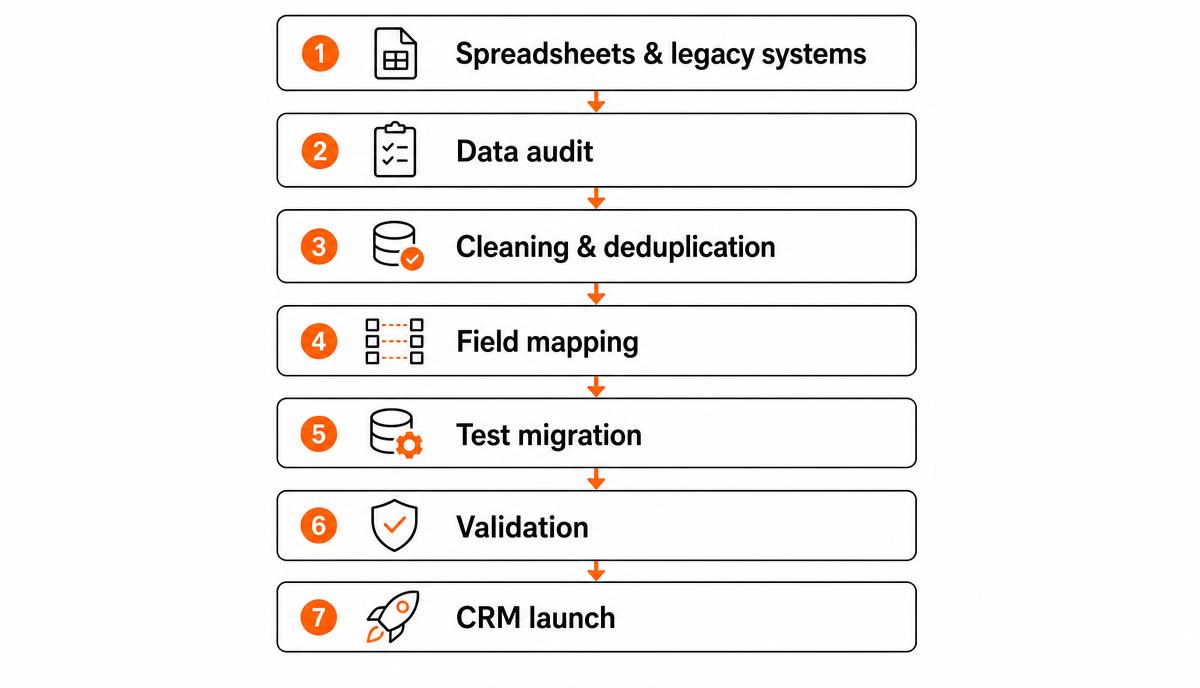
CRM migration is the process of moving existing customer, lead, account and sales data out of spreadsheets, an old CRM or scattered files into a new CRM. A business does it by auditing what data exists and where, cleaning and deduplicating it, defining the new CRM's structure, mapping every old field to a new one, running a test import on a sample, validating the results against the source, training users, and then switching over on a fixed cut-off date with the old files kept read-only as a reference.
Key Takeaways
Migration is a data project, not a software install — most of the effort happens before anything is imported.
Never migrate everything by default. Decide record by category what is active, what is archive, and what should not travel at all.
Deduplicate at the source, in the spreadsheet or export, rather than hoping the CRM will resolve it during import.
A documented field map — old column to new field, with the transformation rule — is the single most useful artefact of the whole project.
Always run a small test import first and validate it against the source before the full load.
Freeze the old system on a cut-off date and keep it read-only; two live systems is how data is genuinely lost.
What Is CRM Migration?
CRM migration is the transfer of existing customer and sales information into a CRM system: contacts, companies, leads, open opportunities, pipeline stages, notes, past activity and whatever supporting records the business relies on. The source may be a set of Excel files, an older CRM the company has outgrown, a bespoke database built years ago, an accounting system doubling as a customer list, or — most commonly — all of these at once.
The migration is part of a larger implementation rather than a standalone task. Choosing the system, designing the pipeline, setting permissions and getting the team to actually use it are covered in our guide to CRM for Saudi businesses. This article assumes that decision is either made or close to being made, and deals with the part that worries people most: the data.
It is also worth saying what migration is not. Moving customer data into a CRM does not mean replacing every system you run. Finance, inventory and operations usually stay where they are and connect to the CRM instead — the boundary between the two is the subject of our comparison of CRM and ERP. A CRM migration touches the customer-facing layer of the business and should be scoped to it.
The rule that decides most migrations
Migrate what the business will use, not everything the business happens to have. Every record you carry across has to be cleaned, mapped, validated and then lived with. Volume is not fidelity.
When Should a Saudi Business Consider CRM Migration?
Spreadsheets are not a failure of discipline; they are a reasonable answer to a small operation. The question is when they stop being reasonable. The signals are usually operational rather than technical, and they tend to appear together:
The same customer exists three times — once in the sales sheet, once in the quotations folder, once in someone's phone — with three different phone numbers.
Two people edit the same file and the version that survives is whoever saved last.
Enquiries arrive on WhatsApp, Instagram, email and the website, and nobody can say how many came in last month.
A salesperson leaves and their pipeline leaves with them, because it lived in their own file and their own conversations.
Producing a simple sales report takes half a day of copy-paste, and the number is challenged in the meeting anyway.
Nobody can answer "what is the status of this customer?" without asking a specific person.
Follow-ups depend on memory, so quiet deals go quiet permanently.
The business wants to add salespeople or branches, and the current arrangement clearly will not stretch.
One or two of these is a process problem. Four or five means the data itself has become the constraint, and no amount of discipline in a spreadsheet will fix it. At that point a CRM migration is the practical entry point into a wider digital transformation — customer data is usually the first thing worth centralising, because it is where the revenue is.
The other common trigger is migrating from an existing CRM rather than from spreadsheets: a system bought quickly, configured by nobody in particular, abandoned by the sales team and now half-populated. That case is technically easier — the data is structured — but organisationally harder, because you are asking a team to trust a category of tool that already disappointed them once.
What Data Should You Migrate to a CRM?
Work through the data by category rather than by file. For each category, decide whether it moves, moves in summary form, or stays behind in an archive.
Contacts — people, with name, role, phone, email and preferred language. The core of the migration.
Companies or accounts — the organisations those contacts belong to, so records group correctly instead of floating as loose names.
Leads — enquiries not yet qualified. Usually the messiest category and the one that most needs pruning.
Opportunities or deals — active sales with a value, an owner, an expected close and a current stage.
Pipeline stages — the stage each open deal sits in, translated into the new pipeline definition rather than copied literally.
Activities and next steps — scheduled calls, meetings and follow-ups that are still pending. Past activity is optional; pending activity is not.
Notes and history — the context that explains a relationship. Migrate selectively, typically for active customers only.
Communication records — email or WhatsApp history, where the new system supports importing it and where it has genuine value.
Products and services with price references, if the CRM will produce quotations.
Custom fields — the handful of business-specific attributes you genuinely filter or report on, such as region, sector or referral source.
Just as important is what should be reviewed before it moves, and often left behind. Contacts with no activity for several years and no identifiable owner. Leads that were never real. Records with a name and nothing else. Personal notes about individuals that serve no business purpose and that nobody would want in a shared system. Duplicated companies created by spelling variants — a real problem when the same organisation is written in Arabic in one file and English in another. Free-text columns where five people used five conventions.
A defensible default: migrate all active customers and open deals in full, migrate dormant records in a reduced form with the key identifiers only, and archive the rest in a read-only export that stays accessible without polluting the new database.
Common data sources and what to watch for in each.
Data belongs to a person rather than the company and is easily lost
Collect early, verify with the owner, and capture the relationship context in structured notes
Accounting or ERP system
Billed customers, invoices, credit terms
Duplicating finance data inside the CRM and letting the two drift apart
Import identity data only and integrate for the rest; keep one authoritative source per field
CRM Migration Step by Step
The sequence below is deliberately conservative. Every step exists because skipping it is expensive later, and the earlier steps are where the real work sits — by the time you press import, the outcome is largely already decided.
The migration path from scattered sources to a live CRM.
1. Audit Your Existing Data
List every place customer data currently lives, who owns it, how many records it holds, how recently it was updated, and whether anyone actually relies on it. Include the informal sources — a sales manager's personal file, the receptionist's enquiry notebook, the phone used for WhatsApp. The audit almost always finds two or three sources nobody mentioned in the first conversation.
Record volumes matter here because they set the scale of everything that follows. Four thousand contacts across two files is a different project from forty thousand across nine.
2. Clean and Deduplicate the Data
Clean in the source files, not in the CRM. Standardise phone numbers to a single international format, since the same Saudi mobile can appear as 05…, 9665…, +9665… and with spaces or dashes. Split combined columns such as "Name / Company". Fix Arabic and English spellings of the same company. Normalise obvious variants of city and sector names. Convert dates to one format.
Then deduplicate against an explicit matching rule — mobile number is usually the most reliable in a Saudi context, with email second and company name a distant third. When two records conflict, the rule for which one wins should be written down before anyone starts merging, not decided case by case at speed.
This is the step people try to skip, and it is the step that determines whether the CRM is trusted three months later. A duplicate that survives migration reappears as two salespeople calling the same customer.
3. Define the New CRM Structure
Before mapping anything, decide what the new system should contain: the pipeline stages and what each one means, who owns which records, the mandatory fields, the small set of custom fields worth keeping, and how Arabic and English names will be stored. Design this around how the business sells now, not around the shape of the old spreadsheet.
Resist the temptation to recreate every column that existed before. Migration is the rare, cheap moment to drop fields nobody has filled in for two years.
4. Map Old Fields to New Fields
Produce a mapping document: source file, source column, destination object, destination field, transformation rule, and what happens when the value is missing or unrecognised. "Status" in an old sheet might contain a mixture of pipeline stage, lead source and a comment; each of those goes somewhere different, and the rule for splitting them belongs in the map.
This document is the artefact that makes the migration reviewable, repeatable and fixable. It is also what lets a second person check the work without reverse-engineering somebody's import file.
5. Decide What Historical Data to Keep
Historical records are where scope quietly doubles. Ask what each type of history is actually for. Past deals support renewal and repeat-sales conversations, so they earn their place for active accounts. Years of closed-lost leads rarely change a decision and mostly add noise to search results and reports.
A workable compromise is a cut-off: full history for a defined recent period and for all active customers, summarised or archived data before it. Whatever you leave out, keep a complete read-only export of the original sources somewhere safe and known.
6. Prepare the Migration
Set up the CRM before importing: users, teams, pipelines, stages, custom fields, permissions and record ownership rules. Import in dependency order — companies before contacts, contacts before deals, deals before activities — so relationships attach correctly instead of creating orphan records.
Agree the cut-off date now, and communicate it. From that date the old files are read-only. Running both systems "just for a while" is the most reliable way to end up with two incomplete versions of the truth.
7. Run a Test Migration
Import a representative sample — a few hundred records including the awkward ones: Arabic names, companies with several contacts, deals with unusual values, records missing key fields. Deliberately include the cases you expect to break.
The test is where you discover that Arabic text arrived garbled because of file encoding, that leading zeros disappeared from phone numbers, or that every deal landed in the first pipeline stage. All of those are trivial to fix on three hundred records and painful on thirty thousand.
8. Validate the Results
Validation is a comparison against the source, not a glance at the screen. Check record counts per object, total pipeline value against the old report, a random sample of records field by field, correct owner assignment, correct linking of contacts to companies, and correct rendering of Arabic text.
Have a salesperson — not only the project owner — open ten customers they know well and confirm the records look right. They will spot in a minute what a checklist misses.
9. Train Users
Train on the migrated data, not on a demo database. People adopt a system when they open it and find their own customers, their own deals and their own follow-ups already there. Keep the first session narrow: find a customer, log an activity, move a deal, add an enquiry. Advanced features can wait.
Be explicit about the new rules — what must be recorded, when a stage changes, and where a customer conversation now lives. Migration changes where the truth is kept, and that has to be said out loud.
10. Launch and Monitor
Go live on the cut-off date with the old sources frozen. For the first two weeks watch usage rather than outcomes: are deals moving, are activities being logged, are new enquiries landing in the CRM instead of a private chat? Keep a visible channel for data corrections, because users will find issues no validation pass caught.
Once the data is clean and people are working in the system, the value compounds — reliable records are the precondition for reporting, for integrations, and for automating CRM follow-up and assignment. Automation on top of dirty data simply distributes the errors faster.
Common CRM Migration Mistakes
Migrations rarely fail dramatically. They fail quietly, and then the team goes back to a spreadsheet. These are the recurring causes:
Importing everything untouched, on the assumption that cleaning can happen later inside the CRM. It never does.
No named owner for the data. When accuracy is everyone's responsibility it is nobody's, and decisions stall.
Careless field mapping — dumping mixed content into a notes field because deciding where it belongs is harder.
Ignoring duplicates, then discovering that reports double-count and two salespeople are chasing one customer.
Redesigning the sales process during the migration, so nobody can tell whether a problem is the data or the new process.
Skipping the test import to save a few days, then debugging live in front of the sales team.
Treating training as an announcement rather than a session on real data.
Declaring success without validating counts and values against the source.
Underestimating integrations — website forms, WhatsApp, email, accounting — which are usually the second half of the project.
Framing migration as an IT task. It is a business decision about which records the company keeps and who is responsible for them.
The last point deserves emphasis. The decisions that make a migration work — what an active customer is, who owns which accounts, which stages exist — are operational, and they often expose process inconsistencies that predate the software entirely. That is a good outcome, provided you fix the process deliberately rather than mid-import; the wider view of that work is covered in our guide to business process automation.
How Long Does CRM Migration Take?
There is no standard duration, and any timeline quoted before someone has seen your data is a guess. What actually determines it:
Volume of records, and how many objects they span.
Data quality — the single largest variable, and the hardest to judge from outside.
Number of separate sources and whether they share any identifier.
Complexity of the target CRM configuration: pipelines, teams, permissions, custom fields.
Integrations in scope, such as website forms, WhatsApp, email or accounting.
How much history is being carried across.
Number of users to train and how many roles they cover.
Availability of the people who know the data — usually the real bottleneck.
As an illustrative shape only, and not a commitment: a single clean spreadsheet of a few thousand contacts moving into a standard configuration is a short project measured in days of focused work; several sources with dirty data, custom fields, history and two or three integrations is measured in weeks. Cleaning and validation typically consume more time than the import itself, which often runs in minutes.
The same variables drive budget as well as duration, since migration effort is one component of an implementation quotation — the full breakdown is in our article on what CRM implementation costs in Saudi Arabia.
CRM Migration Checklist
Use this as a review structure rather than a schedule. Each stage has one question that has to be answered before the next begins.
Stage-by-stage checks for a CRM migration.
Stage
What to check
Common risk
Audit
Every data source listed with owner, volume and last update
An informal source surfaces after go-live and has to be merged in retrospectively
Scope
Agreement on what moves, what is summarised and what is archived
Scope grows silently and the timeline doubles
Cleaning
Phone and date formats standardised, duplicates merged under a written rule
Duplicates re-enter through a second file cleaned to a different standard
Structure
Pipeline stages, owners, mandatory fields and custom fields defined
The old spreadsheet's shape is recreated instead of the current sales process
Mapping
Every source column mapped to a destination field with a transformation rule
Unmapped content dumped into notes and effectively lost to search and reporting
Test import
Representative sample loaded, including Arabic text and edge cases
Encoding and formatting faults found only after the full load
Validation
Counts, pipeline totals, ownership, links and a sample checked against source
Silent partial loads accepted as complete
Training
Sessions run on real migrated data with the new rules stated
Team keeps a private spreadsheet in parallel
Cut-off
Old sources frozen read-only from a communicated date
Two live systems and a diverging version of the truth
Post-launch
Usage monitored and a correction channel open for the first weeks
Small data errors erode trust before anyone reports them
CRM Migration for Saudi Businesses
Several characteristics of the Saudi market show up repeatedly in migration projects, and planning for them removes most of the surprises.
Bilingual data is the first. Customer and company names exist in Arabic, in English, and in transliterations that vary by whoever typed them. Decide early which language each field is stored in, whether you keep both a legal Arabic name and a trading English name, and how duplicates across scripts will be detected. Encoding must be checked in the test import; Arabic text corrupted at load time is tedious to repair afterwards.
The second is that a large share of the customer relationship lives on WhatsApp. Much of the history a business considers valuable is sitting in personal chats, which are not a company asset in any practical sense. Migration is the moment to decide how that channel becomes part of the system going forward — the mechanics of doing that are covered in our article on running sales conversations through a WhatsApp CRM. Older conversations usually cannot be imported wholesale; the realistic approach is to capture the context of active relationships as structured notes and let the new channel history build from the cut-off date.
Third, sales teams are often relationship-led, with a salesperson personally holding a set of accounts. Migration makes ownership explicit, which is a genuine change and occasionally an uncomfortable one. Handle it as a management conversation before it becomes a data question, and be clear that the company's record of a customer is not a challenge to the person who built the relationship.
Fourth, enquiries arrive across many channels — website, WhatsApp, phone, Instagram, walk-ins, exhibitions. Migrating the backlog is only half the job; the sources also need connecting so the CRM stays complete rather than becoming another partial record.
Finally, handle customer data carefully as a matter of ordinary good practice: restrict access to migrated files, remove exports from personal devices once the project ends, and keep the archive in a controlled location. Where data protection or sector-specific obligations apply to your business, confirm the requirements with a qualified adviser rather than relying on general guidance.
Should You Migrate Your CRM Yourself or Use an Implementation Partner?
Internal migration is entirely reasonable when the data is contained and the configuration is standard: one or two clean sources, a few thousand records, a straightforward pipeline, no integrations, and someone in-house who is genuinely comfortable with spreadsheets and has time protected for the work. Modern CRMs import CSV files well, and the knowledge of the data — which customers are real, who owns what — is inside the business, not outside it.
External help earns its cost in different conditions: several sources with no shared identifier, a legacy CRM export whose fields no longer match how you sell, large volumes, meaningful deduplication work, custom fields, integrations with a website or accounting system, or a team that cannot free up the days the project needs. The other case is a second attempt, where a previous rollout failed and the priority is not repeating it.
Where each approach tends to fit.
Situation
Usually workable in-house
Usually worth a partner
One or two clean sources
Yes
Not required
Legacy CRM with mismatched fields
Difficult
Yes
Significant duplicate resolution
Possible but slow
Yes
Website, WhatsApp or accounting integrations
Rarely
Yes
No internal time available
No
Yes
Either way, keep ownership of the decisions in the business. A partner should be doing the extraction, mapping, transformation, testing and configuration work — not deciding which of your customers matter. At RaysanDev we handle migrations as part of CRM implementation, and the first step is always the same: look at the actual files before saying anything about scope or effort. If you want a view on what your own data would take, send us the details of your current setup and we will tell you what the realistic path looks like.
Related questions
Tags:CRMData migrationImplementationSaudi Arabia
FAQ
Questions about this topic
Where we help
How we help with this
The services most relevant to what this article covers.
What a CRM actually does, which features matter, how to evaluate systems, what implementation involves, and how to measure whether it worked — written for Saudi businesses choosing a CRM for the first time.
What actually drives CRM cost in Saudi Arabia — licences, implementation, data migration, integrations, automation, training and ongoing support — and how to compare quotations without being misled by the licence price.
Which CRM processes to automate first, how to design a workflow that survives contact with a real sales team, where rule-based automation ends and AI begins, and what should never be automated.
Tell us where your customer data lives today and how many records you hold. We will map what should move, what should be archived, and what the migration realistically involves.