


Skip to content

CRM

CRM vs ERP: What's the Difference and Which Does Your Saudi Business Need?

CRM and ERP solve different problems. This comparison explains what each system manages, where they overlap, how they integrate, and how a Saudi business should decide which one to implement first.

RaysanDev Team17 min read
Two Saudi business managers comparing sales and operations dashboards on separate screens in a Riyadh office

CRM and ERP are often discussed as competing purchases, which is the wrong frame. They answer different questions: a CRM answers how revenue is won and how customers are handled, and an ERP answers how the business executes and accounts for what it sold. Most companies eventually run both. The decision that actually matters is which one to implement first, and that depends on where the business is currently losing money.

Quick Answer

A CRM manages customers and revenue — leads, pipelines, follow-up, service history. An ERP manages internal operations — finance, inventory, procurement, HR and business-wide reporting. They overlap around quotations, orders and invoices. A Saudi business that loses deals through weak follow-up needs CRM first; one that loses margin through stock, costing or accounting problems needs ERP first. Growing companies eventually integrate both.

Key Takeaways

  • CRM is a revenue system; ERP is an operations and finance system. Neither replaces the other.
  • They overlap at the quotation, order and invoice — that overlap is where integration matters.
  • Implement first whichever system addresses the loss you can already measure.
  • For most Saudi SMEs under fifty staff, CRM delivers visible return faster than a full ERP.
  • Integration is a project in itself: agree which system owns the customer record before connecting anything.

What Is a CRM?

A CRM — customer relationship management system — is the record of every commercial relationship the business has. It holds companies, contacts, enquiries, quotations, deals, conversations and service tickets, and it enforces the discipline that turns an enquiry into a customer. Its purpose is not storage; it is making sure nothing that could become revenue is dropped. The broader capability set is covered in our complete CRM guide for Saudi businesses.

The people who live in a CRM are salespeople, sales managers, marketing staff and customer service agents. The questions it answers are forward-looking: which deals are open, who has not been contacted, where the pipeline is thin, why the last three tenders were lost.

A useful way to judge whether something belongs in a CRM is to ask whether the information changes how the next conversation with a customer should go. The site visit that revealed a technical constraint, the decision-maker who is on leave until next month, the competitor already quoting — all of that shapes the next contact and therefore belongs on the customer record. A delivery note does not.

What Is an ERP?

An ERP — enterprise resource planning system — is the operational backbone. It runs the general ledger, invoicing and VAT treatment, purchasing, stock, warehouses, projects, payroll and cost reporting, in a single database so that a movement in one area updates the others. Platforms such as Odoo are modular, which is why ERP scope varies so widely between two companies running the same product.

ERP users are finance, procurement, warehouse, production, project and HR staff. Its questions are backward- and inward-looking: what did that job actually cost, what is in stock, what is owed, what was purchased against which budget, and can the numbers be reconciled and filed.

The defining characteristic of an ERP is not the module list but the single source of truth. When a warehouse issues goods, the stock valuation, the cost of sale and the customer invoice all follow from the same transaction. That is why ERP projects are heavier: the system is only trustworthy if every department enters its work correctly, so implementation is as much an agreement between departments as it is a configuration exercise.

CRM vs ERP: The Key Differences

The simplest distinction: a CRM is mostly concerned with people outside the company, and an ERP with resources inside it. Everything else follows from that.

Different questions, different owners, different data — with a deliberate overlap at the order.
AreaCRMERP
Primary purposeWin and retain customersRun and account for operations
Main usersSales, marketing, customer serviceFinance, procurement, warehouse, HR
Core dataLeads, contacts, deals, conversationsAccounts, stock, purchase orders, payroll
SalesPipeline, forecasting, activity trackingConfirmed orders and revenue recognition
Customer managementFull relationship and communication historyCustomer as an accounting and delivery entity
FinanceQuotation values onlyLedger, invoicing, VAT, cash, costing
InventoryNot managedStock levels, movements, valuation
OperationsSales and service processesProcurement, production, logistics, projects
ReportingConversion, cycle time, activity, forecastProfitability, cost, cash, inventory turns
AutomationFollow-up, assignment, notificationsApprovals, replenishment, accounting entries
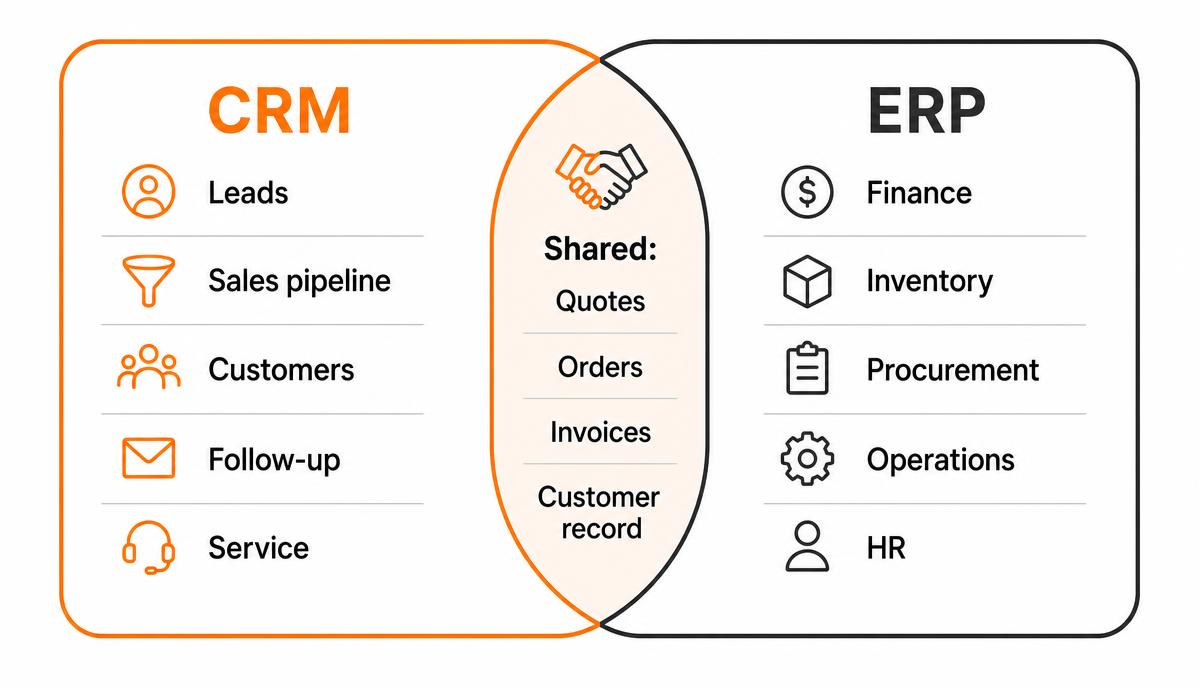
Diagram showing CRM covering leads, pipeline, customers, follow-up and service, ERP covering finance, inventory, procurement, operations and HR, with quotes, orders, invoices and the customer record shared between them
The overlap between CRM and ERP is small but decisive — it is where integration is designed.

What Does a CRM Manage?

A CRM is best understood through the five things it is actually accountable for.

Sales and leads

Every enquiry — website form, WhatsApp message, phone call, exhibition card, referral — becomes a record with a source and an owner. Nothing sits in an individual inbox. When a salesperson leaves the company, the pipeline stays.

Customer communication

Messages, calls and emails attach to the customer record rather than to a person's device. A colleague covering during leave or a manager reviewing a complaint can read the full history in one place, in whichever language the exchange happened.

Follow-ups

Most lost deals in Saudi SMEs are not lost on price; they are lost because the second and third contact never happened. A CRM makes the next action a scheduled, visible obligation with a date and an owner, and shows the manager which obligations are overdue.

Sales pipelines

Stages reflect how your buyers actually decide — site visit, technical evaluation, tender submission, commercial negotiation — not a generic template. That structure is what makes forecasting more than a guess.

Customer service

Post-sale requests become tickets with owners, priorities and response expectations, linked to the same customer record the salesperson uses. Service history then informs renewals instead of being invisible to the sales team.

What Does an ERP Manage?

ERP scope is broader and, for that reason, heavier to implement. These are the modules most Saudi companies begin with.

Finance

General ledger, receivables and payables, bank reconciliation, VAT treatment and e-invoicing obligations. For most companies this is the anchor module — the one that makes the whole system authoritative.

Inventory

Stock by location, movements, reservations, valuation and reorder rules. If your business sells physical goods across more than one branch or warehouse, this is usually the module that justifies the project.

Procurement

Requests, approvals, purchase orders, supplier records and goods receipt matched to invoices. It is where spending control stops depending on who remembered to ask.

Operations

Projects, service jobs, manufacturing or logistics, depending on the business model — with time, materials and cost captured against the job rather than reconstructed at month end.

HR

Employee records, contracts, leave, attendance and payroll inputs, including the documentation local employment administration requires.

Business-wide reporting

Because the modules share one database, an ERP can answer questions no single department can: margin per product line, cost per project, cash position against committed purchase orders.

When Does a Saudi Business Need a CRM?

A CRM becomes necessary when the volume or the number of people involved exceeds what memory and messaging apps can hold. The signals are consistent across industries.

There is a second, quieter trigger: the moment the owner stops being personally involved in every deal. While one person sees all the enquiries, the business has a CRM — it is simply held in someone's head. Delegation is what turns that arrangement into a risk, because the information stops being shared automatically and nobody notices until a customer mentions a promise no one has recorded.

  • Enquiries arrive on several channels — WhatsApp, phone, website, walk-in — and no one can say how many arrived last month.
  • More than two people sell, and each keeps their own list.
  • Managers cannot see the pipeline without asking for it in a meeting.
  • Quotations are sent and never chased on a defined schedule.
  • A salesperson leaving takes relationships and context with them.
  • Repeat and referral business depends on individuals remembering, not on records.

A simple test

Ask three salespeople how many open opportunities they have and what the next action is on each. If the answers take more than a minute or contradict the manager's view, the CRM case is already made.

When Does a Saudi Business Need an ERP?

ERP need shows up as financial and operational friction rather than as lost sales. The symptoms are usually visible in the month-end close.

  • Stock figures in the system and on the shelf disagree often enough that staff check physically.
  • Job or project profitability is calculated in spreadsheets, weeks after delivery.
  • Purchasing happens without an approval trail, and budgets are discovered to be exceeded afterwards.
  • Invoicing, VAT and e-invoicing compliance require manual work in more than one place.
  • Multiple branches or entities each maintain their own version of the numbers.
  • Month-end close is a reconstruction exercise rather than a report.

A useful distinction here: spreadsheets are not the problem in themselves, and many well-run Saudi companies operate on them for years. They become the problem when several people maintain versions of the same one, when the answer to a question depends on which file you open, or when regulatory reporting depends on a manual step somebody has to remember. At that point the cost of an ERP is compared not against the software you have, but against the errors and the delay you are already absorbing.

When Should a Business Use Both CRM and ERP?

Both systems are justified once the commercial process and the delivery process each have enough volume to need their own discipline — and, critically, once the handover between them is causing errors. The classic symptom is a sales team promising delivery dates the operations team cannot honour, because neither can see the other's reality.

Run together, the division of labour is clean: the CRM owns everything up to a won deal, the ERP owns everything after it, and the confirmed order is the handover point. The customer record exists in both, but only one of them is the master. Deciding which is the single most important design decision in the integration.

There is also an internal-politics dimension that is easy to underestimate. Sales teams and finance teams evaluate the same customer differently: one sees potential, the other sees credit exposure and overdue invoices. Running both systems well means accepting that both views are legitimate and deciding in advance which one governs a specific decision — whether a new order can be accepted while an invoice is outstanding, for example. Software cannot settle that; it can only enforce whatever the business decides.

Two systems with two versions of the customer is worse than one system with none. Ownership must be decided before connection.

CRM vs ERP for Small and Medium-Sized Businesses

For a Saudi SME the practical constraint is rarely licence cost — it is attention. An ERP touches finance, purchasing, stock and HR simultaneously and demands disciplined data from people who are already fully occupied. A CRM touches one team and can be live in weeks.

Company size matters less than complexity. A twelve-person trading company with three warehouses and consignment stock has a genuine ERP problem, while a sixty-person consultancy invoicing monthly against contracts may not. Count the number of places where value can be lost without anyone noticing: unbilled work, unrecorded stock movements, unapproved spending, unchased quotations. Whichever list is longest points at the system to buy.

Sequence follows the loss you can already quantify, not the size of the software.
Business situationSensible first systemReasoning
Service company, few staff, growing enquiry volumeCRMRevenue leaks through follow-up, not through operations
Trading or retail with multiple branchesERPStock and margin accuracy dominate the risk
Contracting with project cost overrunsERPJob costing and procurement control are the exposure
B2B sales with long cycles and tendersCRMPipeline visibility and follow-up discipline decide outcomes
Accounting under control, sales chaoticCRMAddress the measurable loss first
Sales strong, delivery and invoicing failingERPGrowth is being destroyed after the sale

How CRM and ERP Integration Works

Integration means agreeing which system owns which field, then synchronising a small, deliberate set of objects. It is not a general merge of two databases, and it is a mistake to attempt one.

Before any technical work, three questions have to be answered in writing: which system creates a customer, what happens when the same customer exists in both with different details, and who is notified when a synchronisation fails. Projects that skip these questions do not fail at connection time — they fail three months later, when two lists have drifted apart and nobody can say which is correct.

  1. Customer master: usually created in the CRM, pushed to the ERP once the deal is won and financial details exist.
  2. Products and prices: owned by the ERP, read by the CRM so quotations use valid items and current pricing.
  3. Quotation and order: prepared in the CRM, confirmed into the ERP as a sales order.
  4. Invoice and payment status: owned by the ERP, shown read-only in the CRM so sales can see who has paid.
  5. Stock availability: owned by the ERP, surfaced in the CRM so salespeople stop promising unavailable goods.

Timing is a design choice as much as direction is. Real-time synchronisation is necessary for stock availability and payment status, where a stale value causes a visible mistake. A scheduled hourly or nightly transfer is entirely adequate for product catalogues and historical invoices, and it is cheaper to build, cheaper to monitor and far easier to recover when something goes wrong.

Most connections are one-way per field, which avoids conflicts entirely. Two-way sync is only worth its cost when both sides genuinely edit the same data — and it requires explicit conflict rules. Where a standard connector does not exist, the gap is closed with custom development, priced as a build rather than as configuration.

How to Decide Which System to Implement First

Use a short, evidence-based framework rather than a feature comparison. Four questions are usually enough.

  1. Where is the measurable loss? Unanswered enquiries and unchased quotations point to CRM; stock write-offs, cost overruns and late invoicing point to ERP.
  2. Which process is defined? Implement the system whose process the business can describe in writing today; an undefined process inflates every implementation.
  3. Who will own it internally? A system without a named internal owner degrades within a quarter, regardless of which category it belongs to.
  4. What is the compliance deadline? Regulatory obligations around invoicing and reporting can override commercial preference and force ERP first.

The default for growing SMEs

When the answers are genuinely balanced, start with the CRM. It is smaller, faster to adopt, affects revenue directly, and produces the clean customer data an ERP project will need later.

Common CRM and ERP Selection Mistakes

  • Buying an ERP to fix a sales problem, because the ERP was already on the roadmap.
  • Buying a CRM to fix an accounting problem it was never designed to touch.
  • Choosing on feature lists instead of on the two or three processes that actually cost money today.
  • Implementing both at once with the same overstretched team and no clear sequence.
  • Leaving customer-record ownership undefined, then discovering two conflicting master lists.
  • Treating the software as the change, and skipping the process definition that makes it useful.
  • Selecting a platform no local partner supports well, then paying for that isolation for years.

One further mistake deserves naming separately, because it is expensive and common: buying software to avoid a management decision. If two branches disagree on how discounts are approved, or nobody will say which team owns a customer after handover, no system will resolve it. The implementation will simply surface the disagreement in the middle of the project, when the cost of resolving it is highest and everyone is already committed.

CRM and ERP Implementation Considerations

The two projects differ in shape. A CRM implementation is mostly process design, configuration, data cleaning and adoption; it can reach production quickly and be extended in phases. An ERP implementation involves finance sign-off, opening balances, a cut-over date and parallel running — it is a business event, not just an IT deployment. Costs behave differently too, as set out in our article on CRM implementation cost in Saudi Arabia.

ConsiderationCRM projectERP project
Typical first-phase scopeOne sales team, one pipelineFinance plus one operational module
Data migrationCustomers, contacts, open dealsChart of accounts, balances, stock, suppliers
Go-live styleIncremental, team by teamCut-over at a period boundary
Main riskPoor adoption by the sales teamIncorrect balances or stock at cut-over
Business disruptionLowModerate to high around go-live

Both benefit from the same discipline used in any digital transformation programme: define the process, phase the rollout, and measure adoption rather than installation. Automating a broken process is covered in more detail in our guide to business process automation.

When Should You Work With an Implementation Partner?

A small team with one straightforward process and clean data can often configure a CRM alone. Bring in a partner when several systems must exchange data, when finance and operations are both in scope, when Arabic and English use must work side by side, or when an earlier attempt has already failed and the team is sceptical.

The value of a partner is rarely the configuration itself, which is increasingly straightforward on modern platforms. It is the sequencing: knowing which twenty per cent of the requirements to implement first, which requests to postpone until the team has used the system, and which apparently reasonable customisation will cause maintenance problems for years. That judgement comes from having seen the same projects go wrong.

RaysanDev implements Bitrix24 CRM and Odoo ERP, connects them where both are needed, and adds WhatsApp automation and AI-assisted automation on top of a working configuration rather than in place of one. The starting point is your process, not a product demonstration.

Conclusion

CRM and ERP are not alternatives. One protects revenue, the other protects margin, and a growing company needs both eventually. Implement first whichever addresses the loss you can already quantify, keep the first phase narrow, and design the handover between the two systems before you connect them. If you want a view on which system your business should start with, tell us how the work flows today and we will give you an honest sequence.

Related questions

Tags:CRMERPComparisonSaudi ArabiaSystem Selection

FAQ

Questions about this topic

Insights

Related articles

A finance and operations manager reviewing a CRM implementation budget breakdown on a desk
CRM

How Much Does CRM Implementation Cost in Saudi Arabia?

What actually drives CRM cost in Saudi Arabia — licences, implementation, data migration, integrations, automation, training and ongoing support — and how to compare quotations without being misled by the licence price.

12 min read
An operations manager presenting an automated workflow diagram to colleagues in a Riyadh office
Digital Transformation

Business Process Automation in Saudi Arabia: A Practical Guide

How Saudi businesses identify, prioritise and implement process automation — which processes to start with, how to choose between CRM, ERP and custom automation, what it costs and how to measure the result.

15 min read

See the full blog or the FAQ library.

Not sure whether you need CRM, ERP or both?

Describe how enquiries, quotations, stock and invoicing move through your business today. We will tell you which system to start with and why.