


Skip to content

CRM

WhatsApp CRM for Saudi Businesses: How to Manage Sales and Customer Conversations

How Saudi businesses turn WhatsApp from scattered personal chats into a managed sales and service channel — shared conversations, assignment, follow-up, automation and reporting inside the CRM.

RaysanDev Team16 min read
A sales employee in a Saudi office replying to customer messages on a phone beside a CRM dashboard on a monitor

In Saudi Arabia, the first contact with a customer usually happens on WhatsApp. The problem is not the channel — customers are right to prefer it — but where the conversation lives. When enquiries sit on employees' personal phones, the business cannot see its own demand: it does not know how many people asked, who replied, what was promised, or which conversations went quiet. A WhatsApp CRM setup fixes the ownership of that conversation without asking customers to change their habits.

Quick Answer

A WhatsApp CRM connects WhatsApp to your customer database so every conversation becomes a CRM record with an owner, a stage and a history. Instead of chats living on personal phones, messages create or update leads, get assigned automatically, trigger follow-up tasks, and appear in reporting. Saudi businesses use it to stop losing enquiries and to keep customer history when staff change.

Key Takeaways

  • The problem is not WhatsApp; it is that conversations live on individual phones instead of in the business.
  • WhatsApp Business helps a single operator; a WhatsApp CRM is what multiple employees need.
  • Every incoming message should create or update a CRM record with an owner and a next step.
  • Automate capture, assignment, reminders and notifications — not the substance of the conversation.
  • Cost is driven by conversation volume, number of agents, integrations and automation depth, not by the app itself.

What Is a WhatsApp CRM?

A WhatsApp CRM is not a separate product category so much as a working arrangement: your CRM connected to WhatsApp through the official Business Platform, so that messages, contacts and outcomes are stored where the rest of your customer data already lives. The CRM side is a normal system — see our guide to CRM for Saudi businesses — and WhatsApp becomes one of its channels rather than a parallel universe.

In practice this means an incoming message from an unknown number creates a lead; a message from a known customer attaches to their record; the agent replies from the CRM interface; and the manager sees volume, response times and outcomes without reading anyone's phone.

The distinction that matters commercially is between a shared inbox and a customer system. A shared inbox lets several people answer the same messages, which solves the coverage problem and nothing else. A CRM-connected channel additionally knows who the person messaging is, what they bought last year, which quotation is open, and what the next step was supposed to be — which is the information that changes the quality of the reply.

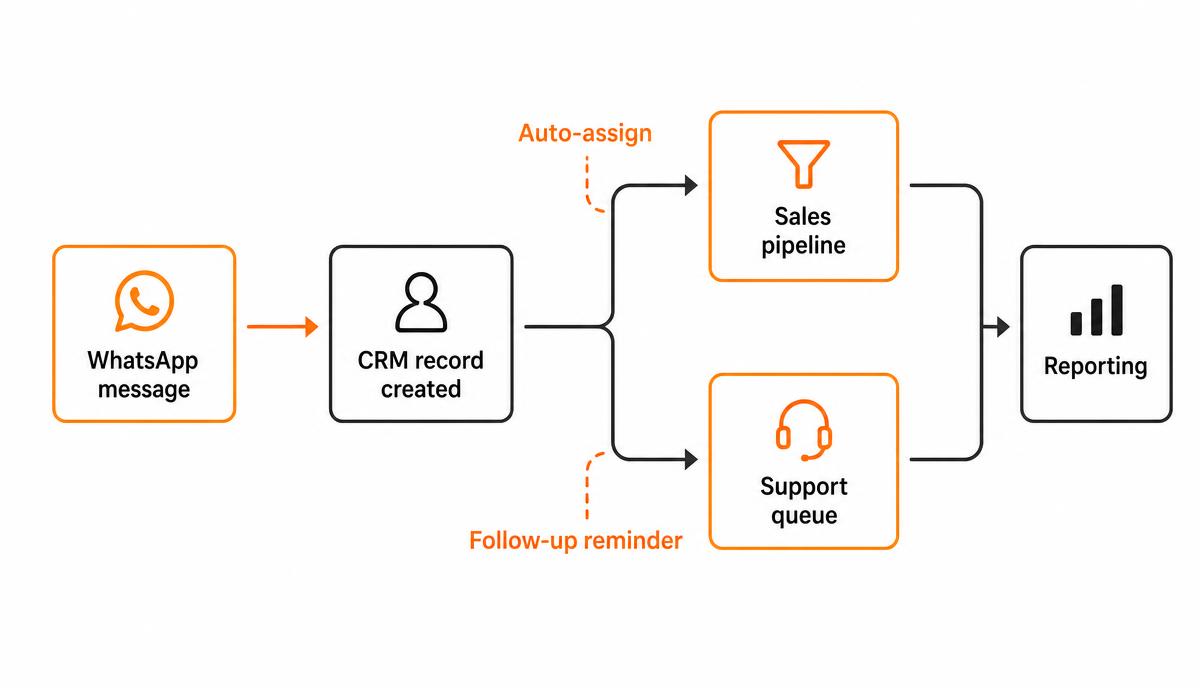
Workflow diagram showing a WhatsApp message creating a CRM record, then routing to either the sales pipeline or the support queue, with auto-assignment and follow-up reminders feeding into reporting
One inbound message, one record, one owner — then either sales or service, and always reporting.

Why WhatsApp Conversations Become Difficult to Manage

The failure is gradual. One person answering enquiries on a phone works perfectly. Three people, two numbers and a hundred conversations a week does not, and the symptoms are recognisable in almost every growing Saudi business.

  • Multiple employees: the customer messages whichever number they were given, and no one else knows the exchange happened.
  • Lost conversations: an enquiry arrives during a busy afternoon, is read, and is never returned to.
  • Slow follow-up: nothing schedules the second contact, so the second contact depends on memory.
  • No visibility: a manager cannot answer how many enquiries came in last month or what happened to them.
  • Duplicate records: the same customer exists as a phone contact, a CRM entry and a chat thread with no link between them.
  • No reporting: response time, conversion and channel value are unmeasurable, so the channel cannot be improved.

The staff-turnover test

If a salesperson resigned tomorrow, could you recover their open conversations and the commitments made in them? If the answer depends on their personal phone, the business does not own its customer relationships.

How WhatsApp and CRM Work Together

Connection is through the WhatsApp Business Platform, using a business number verified for your company. Messages flow into the CRM, replies flow back out, and the conversation is stored against the customer. Our WhatsApp automation service page describes the setup work; the operational logic is what matters here.

  1. A message arrives on the business number.
  2. The CRM matches the phone number to an existing customer or creates a new lead with the source recorded.
  3. Routing rules assign an owner — by team, product line, language or availability.
  4. The agent replies from the CRM; the exchange is stored on the record.
  5. The outcome moves the deal stage or opens a service ticket.
  6. Follow-up tasks and reminders are created automatically where the rules require them.

Two constraints are worth knowing before designing anything. Businesses can reply freely inside the customer-initiated conversation window; outside it, outbound contact uses pre-approved message templates. And promotional messaging is governed by opt-in and quality rules — a channel used carelessly degrades for everyone in the company.

These constraints shape the operating model more than most businesses expect. Because free-form replies depend on the customer having messaged recently, response speed stops being a courtesy and becomes an operational requirement: answer inside the window and the conversation is normal, miss it and every subsequent contact is a template. Teams that understand this design their shifts and their escalation rules around it, rather than discovering it after go-live.

What Can a WhatsApp CRM Automate?

Automation here should remove administration, not conversation. These are the workflows that consistently repay the configuration effort.

Lead capture

Every first message becomes a record with the number, timestamp, source campaign and initial text. No manual data entry, and no enquiry that exists only as a notification someone swiped away.

Lead assignment

Rules distribute conversations by product, city, language or round-robin, and reassign automatically when the assigned agent is unavailable. Every conversation has exactly one accountable owner.

Follow-up reminders

If a quotation was sent and the customer has not replied within an agreed period, the system creates a task. The reminder is the automation; the message itself should still be written by a person.

Customer routing

A returning customer with an open service ticket goes to service, not to a salesperson who will ask them to explain the problem again. Routing on history is one of the cheapest improvements available.

Notifications

Order confirmations, appointment reminders, delivery updates and document requests are sent as approved templates triggered by CRM events, replacing dozens of manual messages a day.

Sales pipeline updates

Sending a quotation or receiving a confirmation can move the deal stage automatically, so the pipeline reflects reality without a salesperson maintaining it as a separate chore.

Customer support workflows

Incoming issues become tickets with priority and response expectations, escalate when they age, and close with a short confirmation message to the customer.

Reporting

Volume by day and hour, first-response time, conversations per agent, conversion from enquiry to deal, and reasons for loss — none of which exist while the channel lives on personal devices.

WhatsApp CRM for Sales Teams

For sales, the value is continuity. The salesperson opens the customer record and sees the enquiry, the quotation, the last message and the agreed next step, in Arabic or English as it was written. Nothing has to be reconstructed from a scroll of chat history, and a colleague can cover a conversation without the customer noticing a handover.

Managers gain something they previously lacked entirely: a defensible view of the channel. How many enquiries arrived, how quickly each was answered, how many progressed, and which product lines actually generate WhatsApp demand. That converts an informal habit into a measurable sales channel.

It also changes how sales meetings run. Instead of asking each salesperson what is happening, the manager reviews a short list of exceptions: conversations with no reply, quotations with no follow-up, and deals sitting at the same stage for too long. The conversation shifts from reporting to decision-making, which is a better use of the only hour a week the whole team is together.

One caution worth stating plainly: visibility can be misread as surveillance. If the first use of the new reporting is to criticise individual response times, adoption suffers immediately and the team finds ways to keep real conversations elsewhere. Introduce the change as protection against lost enquiries, and use the data to fix routing and workload before using it to assess people.

WhatsApp CRM for Customer Service

Service teams get queue behaviour instead of individual heroics. Requests are logged, prioritised and owned, working hours are declared through an automatic acknowledgement, and unanswered issues escalate rather than expire. Because history stays on the customer record, the third time a customer reports the same fault, the pattern is visible.

  • An acknowledgement message sets expectations immediately, including outside working hours.
  • Tickets carry an owner and a due response, so nothing depends on who happened to read the message.
  • Repeat issues are visible on the record and can trigger a management review.
  • Closed conversations feed satisfaction follow-up without exporting anything.

Service also benefits from something sales rarely needs: language and shift routing. In a business serving both Arabic and English speakers across a six-day week, routing on language and availability removes most of the delay that customers actually notice. It costs nothing beyond the configuration and it is usually the first thing a customer comments on after the change.

WhatsApp CRM and AI

The realistic use of AI on this channel is assistance, not replacement. Useful applications are narrow and verifiable: summarising a long Arabic-English conversation into a two-line note on the record, classifying an incoming message as sales, support or complaint so routing improves, extracting a requested quantity or location into fields, and drafting a reply the agent edits before sending. Broader patterns are discussed under AI business automation.

What consistently disappoints is the unsupervised bot answering commercial questions. Pricing, availability, delivery commitments and complaints carry consequences, and a confident wrong answer on WhatsApp is remembered. Keep AI on classification, summarisation and drafting until the accuracy is demonstrated on your own message history.

Automate the routing and the record-keeping. Let a person own the promise.

WhatsApp CRM vs WhatsApp Business

The WhatsApp Business app is a genuine improvement over a personal account for a single operator. It stops being sufficient the moment more than one person needs to answer, or the moment anyone asks for numbers.

The app manages messages; the CRM manages the relationship behind them.
CapabilityWhatsApp Business appWhatsApp connected to a CRM
Users on one numberLimited device sharingMultiple agents with individual accounts
Conversation ownershipBelongs to the deviceBelongs to the business record
Lead recordsContact list onlyFull lead, deal and service history
AssignmentManual, verbalRule-based and auditable
AutomationGreeting and away messagesCapture, routing, tasks, templates, escalation
ReportingBasic message countsResponse time, conversion, agent and channel analytics
Access controlWhoever holds the phoneRoles, permissions and audit trail
Staff changeHistory leaves with the deviceHistory stays with the business

What Should a Saudi Business Look For in a WhatsApp CRM?

  • Genuine CRM integration — conversations attached to leads and deals, not a standalone chat inbox.
  • Multiple users on one business number, each with their own login.
  • Permissions that limit who can see which customers, and an audit trail of who replied.
  • Complete conversation history retained on the record after staff changes.
  • Automation for capture, assignment, reminders and escalation, configurable without development.
  • Reporting on response time, volume, conversion and agent workload.
  • Template management for outbound notifications, including Arabic templates.
  • Reliable lead assignment rules that reflect language, product and branch.
  • Integrations with your website forms, and with accounting or ERP where orders are processed.
  • Clear data ownership, export rights and access control appropriate to customer data.

Two further checks are worth making before signing anything. First, confirm that the connection uses the official WhatsApp Business Platform rather than an unofficial bridge, because unofficial methods risk the number being blocked and take the customer channel with them. Second, confirm that you can export the full conversation history and customer data at any point — a messaging channel you cannot leave is a commercial dependency, not a tool.

Platforms differ mainly in how deep the CRM side goes. Where the requirement is a full sales system with WhatsApp attached, Bitrix24 is a common fit for Saudi SMEs; where the requirement is heavy messaging volume over an existing system, the integration layer matters more than the CRM brand.

How to Implement WhatsApp CRM

  1. Decide which business number is the official channel and stop distributing personal numbers.
  2. Complete Business Platform verification for the company and the number.
  3. Map the conversation flow: who answers what, in which language, within what time.
  4. Configure the CRM side first — pipeline stages, ticket types, owners and permissions.
  5. Connect WhatsApp and confirm that inbound messages create or match records correctly.
  6. Add assignment rules, then reminders, then templates — in that order.
  7. Migrate active conversations by informing customers of the official number.
  8. Train agents on replying from the CRM rather than the phone, including the handover cases.
  9. Review after two weeks: unassigned conversations, slow responses, wrong routing.
  10. Add reporting and automation depth only once the basic flow is stable.

Sequence matters

Businesses that connect WhatsApp before configuring the CRM end up with thousands of messages attached to nothing. Configure the destination first, then open the channel.

Plan for the transition period as well as the end state. For several months customers will keep messaging the old numbers, so decide now whether those numbers are answered with a short redirection message, forwarded manually into the CRM, or retired on a published date. The businesses that manage this well announce the official number in signatures, invoices, the website and printed material at the same time, rather than one channel at a time.

Common WhatsApp CRM Mistakes

  • Keeping personal numbers alive in parallel, which guarantees an invisible second channel.
  • Automating replies to commercial questions before the routing is even correct.
  • Sending bulk promotional messages without opt-in and damaging the number quality rating.
  • Treating WhatsApp as a separate inbox instead of a CRM channel, recreating the original problem in a new tool.
  • Skipping Arabic templates, so half the outbound communication reads as though it were written for someone else.
  • No owner for unassigned conversations, so out-of-hours enquiries quietly accumulate.
  • Measuring message volume instead of response time and conversion.

The most damaging of these is the parallel personal number, because it is invisible in reporting and entirely reasonable from the employee's point of view — the customer already has it and the habit is years old. It only ends when the official number is genuinely faster and easier to work in than the phone, which is a configuration and training problem rather than a policy problem.

How Much Does WhatsApp CRM Cost?

There is no single market price, and any quotation that arrives before someone has asked about your volume and your systems is not describing your project. Cost separates into four predictable drivers.

The messaging charge is usage-based and independent of your CRM licence — budget for both.
Cost driverWhat moves itRecurring or one-off
CRM licencesNumber of agents and the feature tier requiredRecurring
Conversation chargesVolume and type of WhatsApp conversationsRecurring, usage-based
Setup and verificationBusiness verification, number, templatesOne-off
Configuration and automationPipelines, routing rules, templates, escalationOne-off
IntegrationsWebsite, ERP, accounting, custom systemsOne-off plus maintenance
Training and supportTeam size and languages, ongoing changesOne-off plus optional retainer

The same budgeting logic used for any CRM project applies here, and is set out in detail in our article on CRM implementation cost in Saudi Arabia.

When Should You Work With a WhatsApp Automation Partner?

A single team with one number and simple routing can often set this up internally. A partner earns their fee when business verification stalls, when routing must respect branches, languages and shifts, when the CRM has to exchange data with an ERP or website, or when the volume is high enough that a bad configuration is expensive. RaysanDev handles that work end to end — verification, CRM configuration, routing, templates and the automation layer on top — and treats the process design as the deliverable, not the connection.

Conclusion

WhatsApp is already your busiest sales channel; the only question is whether the business or the handset owns it. Move the conversation into the CRM, give every enquiry an owner and a next step, automate the administration around it, and start measuring response time and conversion. That single change is often the fastest visible step in a wider digital transformation effort. If you want it configured properly, tell us how your team handles enquiries today.

Related questions

Tags:CRMWhatsAppSalesCustomer ServiceSaudi Arabia

FAQ

Questions about this topic

Insights

Related articles

A finance and operations manager reviewing a CRM implementation budget breakdown on a desk
CRM

How Much Does CRM Implementation Cost in Saudi Arabia?

What actually drives CRM cost in Saudi Arabia — licences, implementation, data migration, integrations, automation, training and ongoing support — and how to compare quotations without being misled by the licence price.

12 min read
An operations manager presenting an automated workflow diagram to colleagues in a Riyadh office
Digital Transformation

Business Process Automation in Saudi Arabia: A Practical Guide

How Saudi businesses identify, prioritise and implement process automation — which processes to start with, how to choose between CRM, ERP and custom automation, what it costs and how to measure the result.

15 min read

See the full blog or the FAQ library.

Bring your WhatsApp conversations into one system

Tell us how many people answer customers today and which systems you use. We will design the routing, automation and reporting around your actual process.